From static property listings to a conversion-driven leasing experience: Designing 777 Tower’s digital platform for modern office tenants

Client: Commercial Real Estate / Website Redesign
Timeline: June, 2025 - September, 2025

UX Design
UI Design
UX Research
Design Strategy
Prototyping
Marketplace Systems

777 Tower reimagines how office buildings present themselves online—transforming a static, brochure-style website into a structured, user-centered platform that helps prospective tenants evaluate space, understand amenities, and take action with confidence.

THE COMPANY

777 Tower is a Class A office building located in the heart of Downtown Los Angeles, offering over one million square feet of leasable workspace for businesses of all sizes.As a commercial real estate property, its digital presence plays a critical role in attracting prospective tenants, communicating value, and supporting leasing decisions. However, like many traditional property websites, the experience was primarily static and information-heavy, lacking clear structure, usability, and conversion pathways.

THE GOAL

The goal of this project was to design a responsive website for 777 Tower Los Angeles that reflects the building’s sophistication and functionality while simplifying the leasing experience. The redesigned platform aims to better showcase the tower’s premium amenities, flexible office solutions, and vibrant community. By combining high-quality visuals, interactive elements, and clear navigation, the project positions 777 Tower as a leading destination for professionals and businesses in downtown LA.


PROBLEMS OF WEBSITE?

The primary challenge was that 777 Tower lacked a strong digital presence, making it difficult for visitors and even tenants to find reliable information about the building online. Many interviewees were unaware of an official website, struggled with navigation and parking, and felt the building was exclusive to tenants. Additionally, event participation was low due to poor communication channels.

RESEARCH OBJECTIVES

Through user interviews and competitive analysis, I aimed to understand how prospective tenants evaluate office buildings online, what information they prioritize when exploring leasing options, and what factors influence their decision to move from browsing to inquiry.

METHOD #1: COMPETITIVE ANALYSISA

comparative analysis of commercial real estate websites (including office towers and leasing platforms) was conducted to identify common patterns in how properties present availability, amenities, and location.This helped uncover industry standards, as well as gaps in how information is structured—particularly around clarity, navigation, and conversion pathways.

METHOD #2: USER INTERVIEWS + INSIGHTS

I conducted interviews with individuals actively searching for office spaces or familiar with leasing processes, including startup founders, small business owners, and young professionals.The goal was to understand how users navigate property websites, what information they expect to find quickly (such as pricing, location, and amenities), and what friction points prevent them from taking the next step, such as contacting leasing agents.

RESEARCH FINDINGS

I found that prospective tenants prioritize clarity and efficiency when evaluating office buildings online, with location, availability, and amenities being the most critical factors influencing their decision-making.

Clarity & Usability Score: 68 / 100

This score reflects usability issues identified during testing of the existing website. Users reported difficulty locating key leasing information, including availability, pricing transparency, and parking details.Additional friction points included fragmented navigation, lack of clear calls-to-action, and an over-reliance on static content that made it difficult to move from browsing to inquiry.

While users were willing to explore visual content such as galleries, they rarely engaged with secondary pages like “About” unless it directly supported their decision-making.

Instead, users focused on quickly answering a few core questions:

- Where is the building located?
- What spaces are available?
- Is it convenient (parking, amenities)?
- How do I contact leasing?


When these expectations were not met clearly and quickly, users were less likely to proceed with further inquiry.

USER EXPECTATIONS

LOCATION & CONVENIENCE

Location is one of the first decision-making factors. Users want immediate clarity on where the building is, nearby transit options, and surrounding amenities such as restaurants, gyms, and parking.If this information is not easily accessible, users may leave and compare other buildings instead.

PARKING & ACCESSIBILITY

For office tenants, parking is a critical factor. Users want to know whether parking is available, how convenient it is, and if it supports both tenants and visitors.Lack of clear parking information creates friction and uncertainty in the decision-making process.

CLEAR LEASING INFORMATION

Users expect to quickly understand what spaces are available, including size, layout, and basic pricing indicators.Without clear leasing details, users feel uncertain about whether the building fits their needs and are less likely to continue exploring or reach out.

I found that prospective tenants prioritize clarity and efficiency when evaluating office buildings online, with location, availability, and amenities being the most critical factors influencing their decision-making.

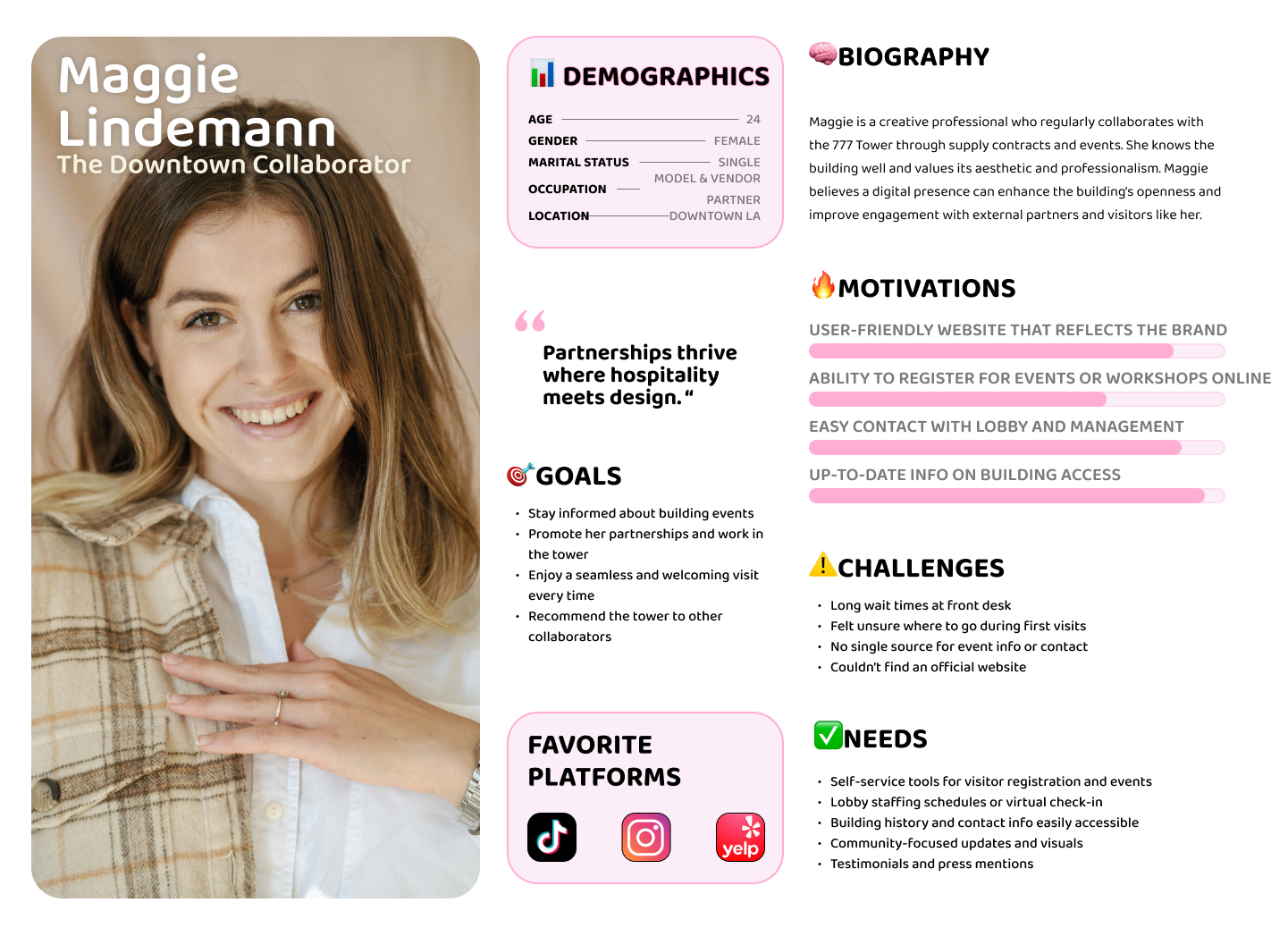
User Case 1:

Maggie explores the building for meetings and partnerships, focusing on amenities and overall experience. When information is scattered or unclear, it limits her ability to engage, showing the need for a more cohesive and accessible platform.
User Case 2:

Chris is looking for an office space and wants to quickly evaluate availability, pricing, and fit. When key information is unclear or hard to find, it creates friction and prevents him from taking the next step, highlighting the need for a clear, decision-focused leasing experience.

Based on the research feedback and competitor landscape, I narrowed in on two main opportunities to address.

How might we support fast and confident leasing decisions?
How might we make complex information clear and actionable?
How might we create a seamless path from exploration to inquiry?

ADDRESSING USER NEEDS


The 777 Tower sitemap organizes leasing information into a clear and user-friendly structure. Users can easily move from the homepage to key sections like Leasing, Gallery, and Tenant Services based on their needs. By separating prospective and current tenant flows while keeping them connected, the experience becomes more intuitive, reduces confusion, and supports a smoother path from exploration to inquiry.

After establishing the sitemap, I am able to address their main concerns with stronger branding to give the site legitimacy and a more compelling aesthetic. I translated them into low-fidelity wireframes to define 777 tower responsive website's core structure.

BUILDING THE WEBSITE

The 777 Tower logo is inspired by the building's iconic cylindrical form and grid-like facade.The goal was to translate its architectural identity into a minimal and recognisable Vision

After the logo design, I decided to use a light, structured palette to create a clean and professional experience. Neutral tones provide clarity and space, while blue accents guide attention and highlight key actions.

And then decided the choice for typography has fallen on Helvetica Neue. With those elements added to my low fidelity wireframes, I made my way into high-fidelity wireframes.

High fidelity Wireframe

PROTOTYING & TESTING

Structuring the 777 Tower Experience Through Tenant Mental Models

The 777 Tower experience was designed around how prospective tenants evaluate office spaces. Through research, I found that users prioritize clarity, convenience, and trust when making leasing decisions.Instead of overwhelming users with scattered information, the system was structured to support easy navigation, transparent leasing details, and a seamless transition from discovery to inquiry. The goal was to create a calm, professional experience that helps users feel confident in exploring and committing to a space.


- Key flow 1: submit  request for Leasing Options & Pricing

- Key flow 2: Current tenant submit Maintenance request

- Key flow 3: Find the parking information

FINAL THOUGHT

777 Tower’s in-person experience is polished and premium but that clarity wasn’t translating online. Early research showed friction around navigation, scattered information, and unclear paths for key actions like leasing and tenant services.

The goal became simple: make everything easier to find, easier to understand, and faster to act on.Through iterative design and testing, the experience was streamlined into clear flows, intuitive navigation, and structured content.

By the final iteration, users could complete core tasks without confusion and described the site as “easy” and “straightforward.”

The result is a website that works as a true extension of the building, functional, clear, and aligned with its professional identity. Moving forward, the focus is on launch, optimization, and turning user engagement into measurable conversion.