From overload to clarity: Reimagining Amazon’s shopping experience for faster decisions and smoother checkout

Reducing cognitive overload and checkout friction through user research, usability testing, and data-driven design decisions.

This project is a fictitious scenario, completed as a part of Designlab's UX Academy.

Role

UX Researcher, UX/UI designer

Timeline

July,2024-September,2024

Tool

Figma, Photoshop, FigJam, Pencil and paper

Overview

This project focuses on enhancing the Amazon app’s shopping experience by simplifying navigation, improving search accuracy, and streamlining the checkout process. Despite its global success, users often face challenges such as overwhelming product information, complex category structures, and confusing checkout steps. Using user interviews, surveys, usability testing, and competitive analysis, I identified key pain points and designed solutions to create a more intuitive, efficient, and enjoyable experience.The goal was to increase user satisfaction, improve product discoverability, and boost conversion rates, ensuring Amazon continues to deliver a seamless and user-centered shopping journey

Problem Statement

Amazon’s app offers extensive features and product options, but its dense interface, complex category structure, and overwhelming information make it difficult for users to navigate efficiently and complete purchases smoothly. As a result, users experience confusion, cognitive overload, and friction during key moments of the shopping journey, negatively impacting satisfaction and conversion.

The Process and Strategy

To address these issues, a comprehensive design strategy will be implemented, focusing on user-centered design principles. The goal of this project is to redesign the Amazon app to be more intuitive and efficient by simplifying navigation, improving product discovery, and streamlining checkout to increase user satisfaction and conversions.

Prioritise the Features

1. Navigation Structure
2. Entry Points / Discovery Paths
3. Search & Filtering
4. Product Information Hierarchy
5. Product Comparison
6. Cart & Checkout Flow
7. Order Review & Confirmation

01/ User Research and Analysis

User Interview

overview

- 5 participants
- Age between 20-30 years old
- voice/video interview
- Time about 20 mins
- Frequent user of Amazon App
User interviews revealed that while participants generally felt comfortable shopping on Amazon, the experience often became overwhelming during product discovery and decision-making. Users relied heavily on price, reviews, and seller credibility, but struggled with information overload, scattered product details, and difficulty comparing similar items. Most participants described their checkout experience as functional but not memorable—efficient when purchasing a single item, yet frustrating when managing multiple items, reviewing costs, or adjusting payment options. These insights highlighted a clear need to reduce cognitive load, improve information hierarchy, and streamline the path from discovery to checkout to support faster, more confident purchasing decisions.

From the User interview, I grouped user insights into six main areas: navigation, decision-making, cart management, checkout experience, transparency, and pain points. I noticed that most users love Amazon’s convenience but still get frustrated when switching between product pages, managing their cart, or checking out multiple items. They also want clearer information, more control over delivery options, and a smoother, more personalized shopping flow. These findings helped me focus my redesign on simplifying navigation, improving the cart experience, and making checkout feel faster and more intuitive.

Competitor Analysis

overview

- 5 e-commerce competitors
- Cross-platform analysis
- Discovery & checkout focus
- Insights for Amazon redesign
The analysis revealed that while all competitors prioritize strong online presence and broad customer reach, they differ significantly in how they balance product variety, brand trust, and personalization. Platforms like Apple and Target emphasize simplicity and brand consistency, while marketplaces such as Alibaba and eBay focus on scale and product diversity—often at the cost of clarity. Etsy stands out through personalization and niche offerings but faces scalability challenges. These insights highlighted opportunities for Amazon to better unify product discovery, comparison, and checkout by combining clarity, trust, and efficiency—informing design decisions focused on reducing cognitive load while maintaining a rich marketplace experience.

02/ Define User Personas

Visualise the emotional journey :

I used experience mapping techniques to create a visual journey of persona, covering all the different interactions during using the amazon app for shopping and map out the emotions the persona went through. This made it clear where our users were running into issues and help me pinpoint where I should concentrate on: Don’t know how to pack and found it’s very time-consuming and realised need to get rid of a lot of stuff.
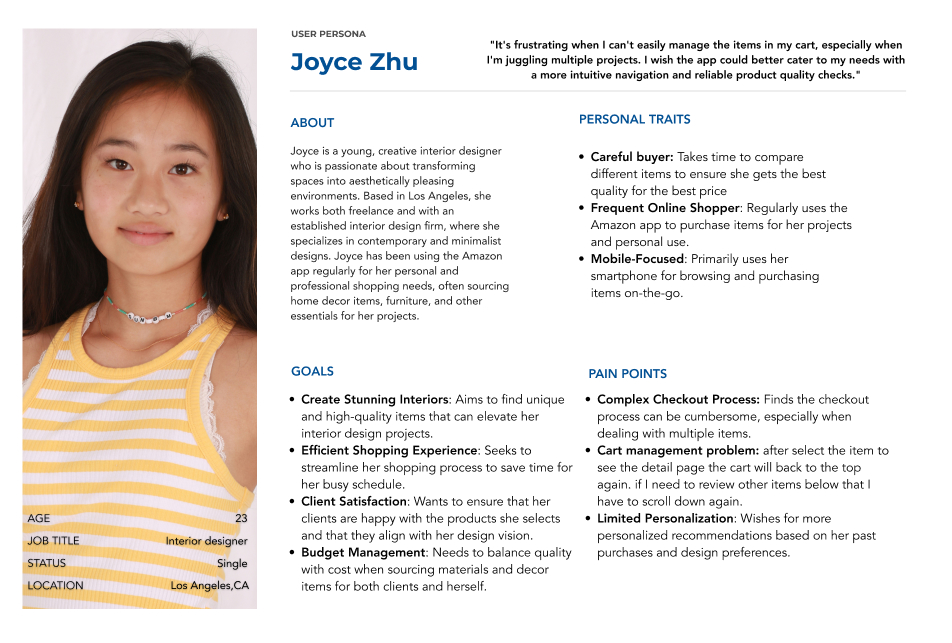
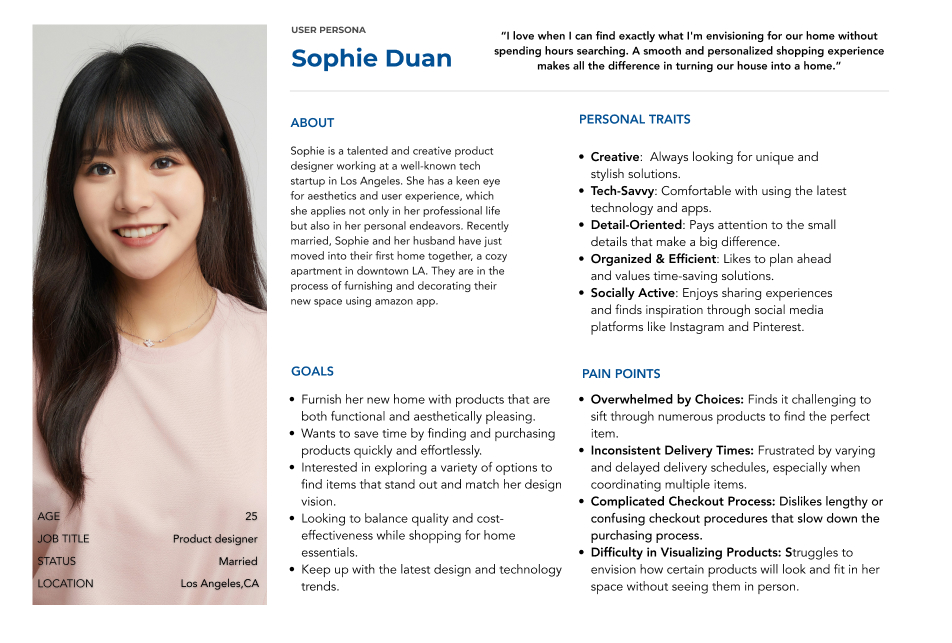
Based on user interviews and behavioral insights, two primary personas were developed to represent distinct but overlapping Amazon shopping needs. Sophie Duan reflects users who value inspiration, aesthetics, and efficient product discovery when shopping for their home, while Joyce Zhu represents frequent, mobile-first shoppers who prioritize control, accuracy, and efficiency when managing multiple items and projects. Both personas highlight common challenges around information overload, cart management, and checkout complexity, while differing in their goals around exploration versus efficiency.

User empathy

After I had a better understanding of my users and their needs, I designated personas types to guide design decision. Our persona hypothesis consisted of 2 archetypes which I made sure I keep checking in them at every milestone. I also identified two use case scenarios that strongly resonate with my personas.
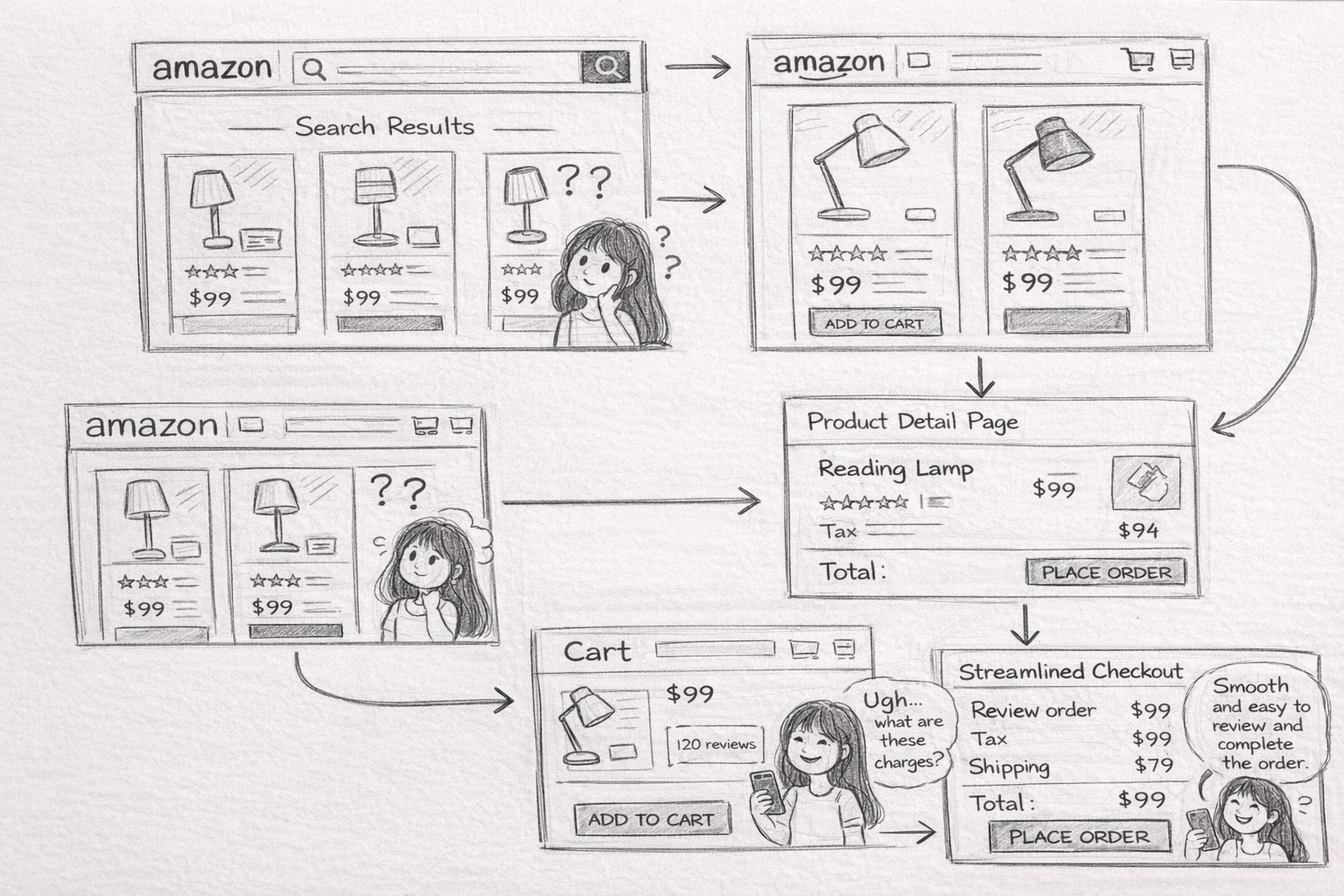
Use Case 1:

Highlights a shopper’s journey from overwhelmed product discovery to confident purchase by improving comparison clarity, price transparency, and streamlining the checkout experience.
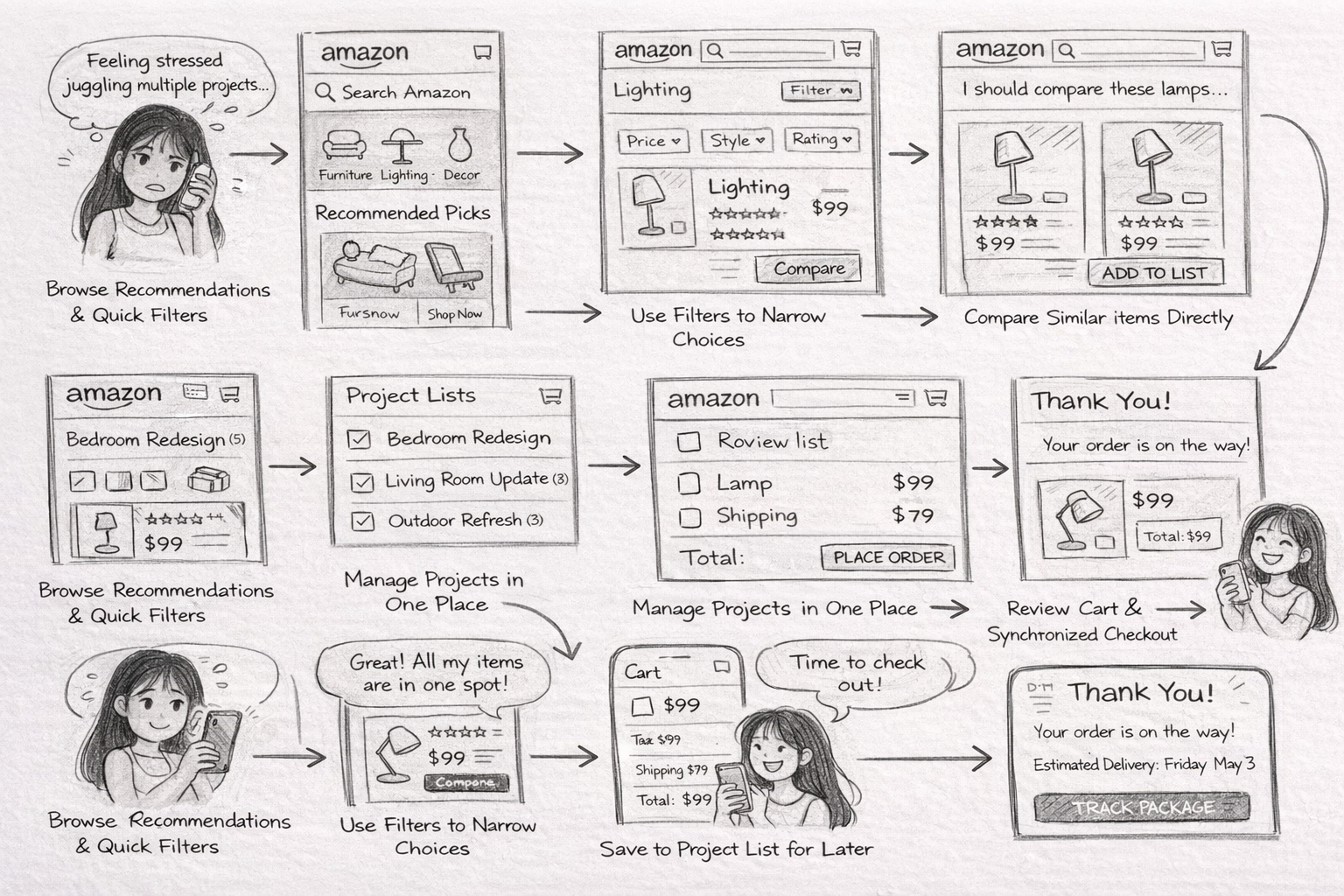
Use Case 2:

Focuses on enabling a mobile-first shopper to efficiently compare products, manage multiple items across projects, and complete checkout with clarity and confidence.
From here, I listed out around 20 different "How Might We" statements to see how problems I can focus my efforts to tackle for the user.

03/ Map the User Journey

We began by identifying key user personas and aligning with project priorities to determine which shopping behaviors to focus on. From there, we mapped out the end-to-end shopping journey—covering product discovery, search, comparison, cart management, and checkout flows based on the most critical friction points.

These core features were also benchmarked against leading e-commerce competitors to identify best practices and improvement opportunities. Different search result layouts, product detail structures, comparison patterns, cart interactions, and checkout experiences were analyzed. All insights were synthesized to inform the redesigned shopping journeys and streamlined user flows.
The sitemap outlines the Amazon app’s core structure, showing how users navigate seamlessly from homepage to product pages, shopping cart, and checkout—highlighting improved organization, clearer hierarchy, and a more intuitive flow for efficient shopping.
After establishing the sitemap, I mapped detailed user flows to define how key features translate into real interactions. From these, I prioritized three task flows that addressed friction in decision-making, cart management, and checkout completion. These flows became the foundation for prototype testing and validation.

04/ Ideation & Concept Development

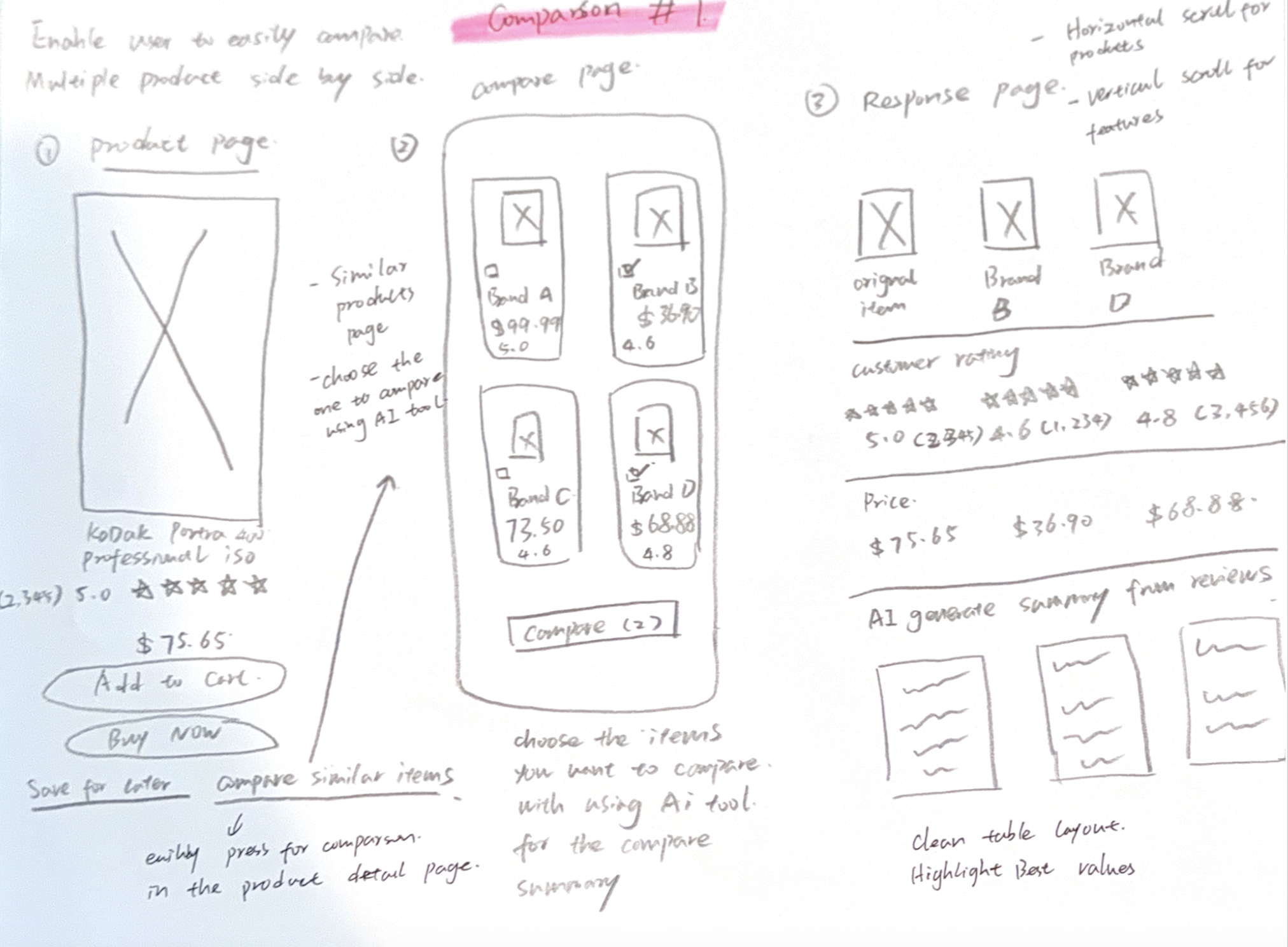
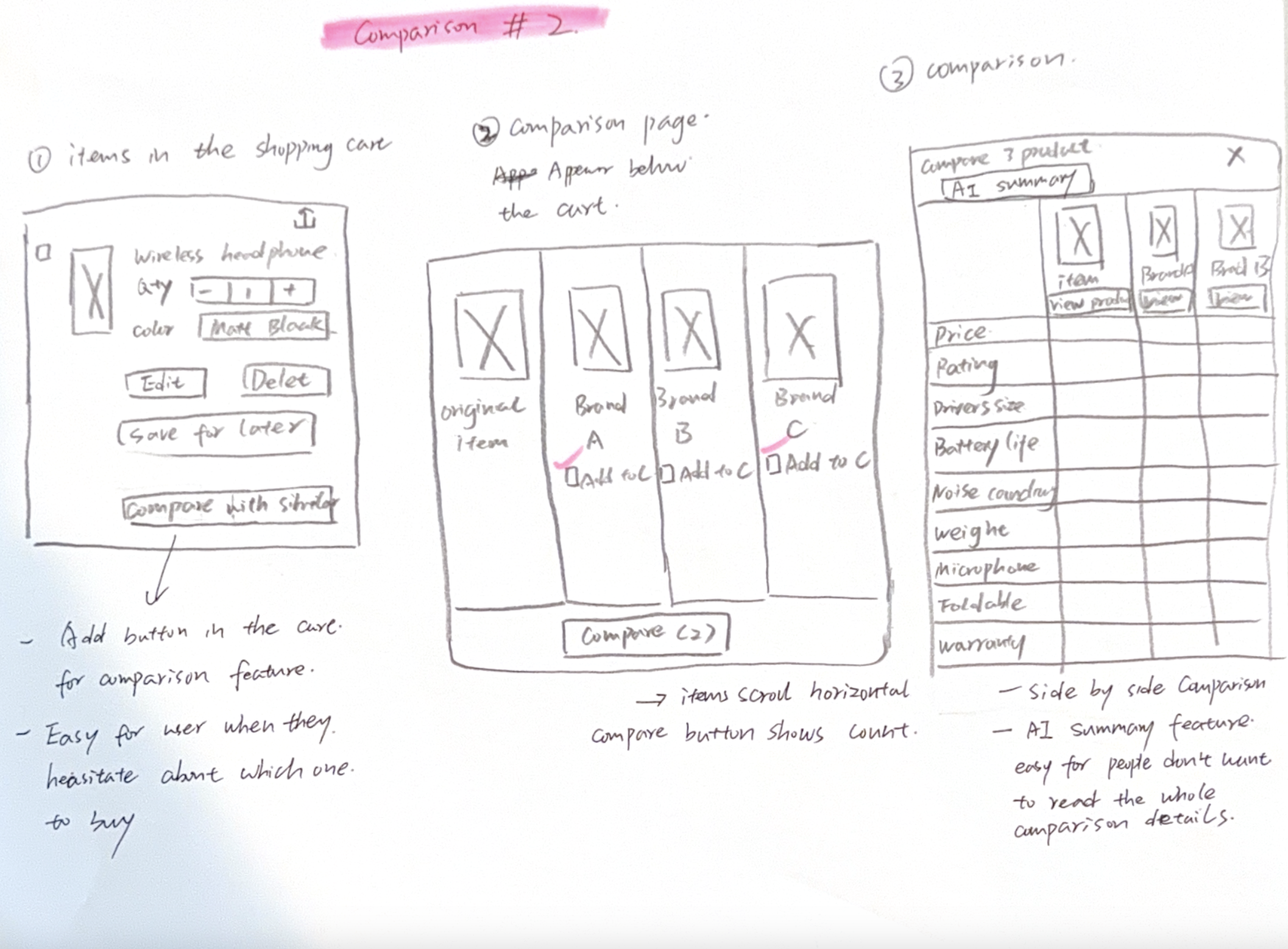
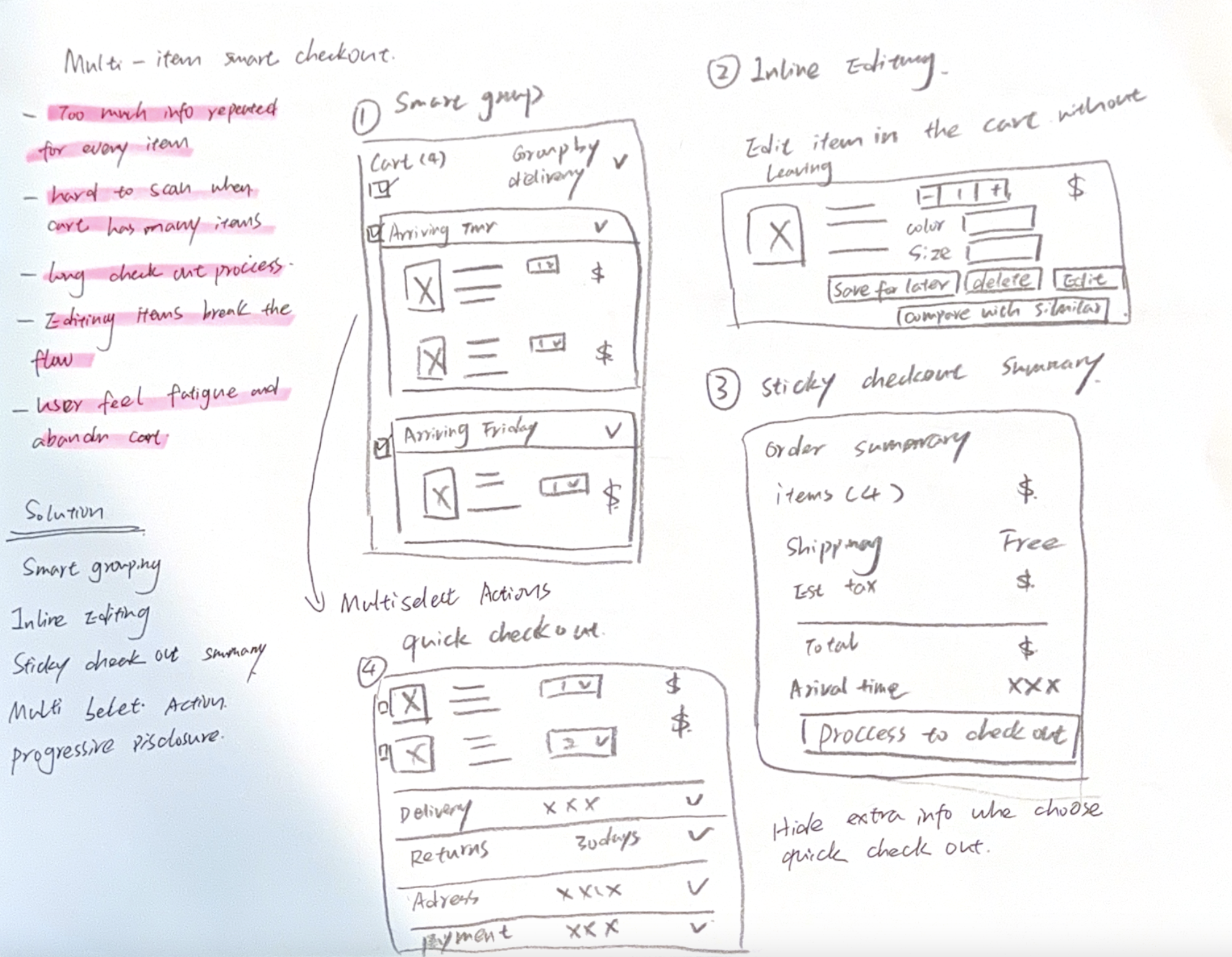
I used Crazy 8s to rapidly generate and refine ideas from research, then grouped the sketches by theme to identify key concepts and also three of the most important user flows ideas
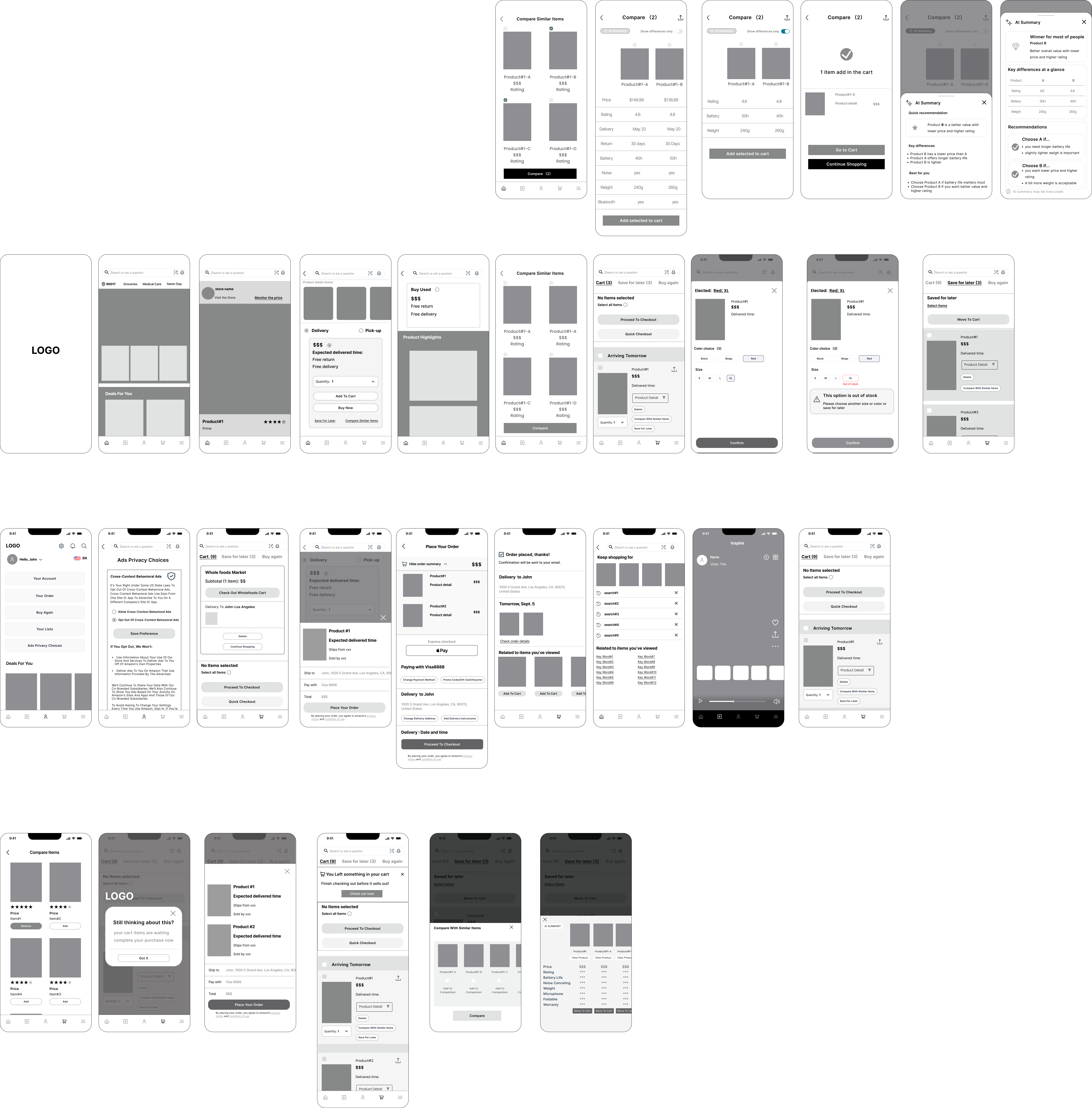
Once I done all the sketch, I moved into low fidelity wireframing to operationalize the concepts into tangible interfaces. The goal at this stage was to test structure over visuals, prioritizing layout hierarchy, decision points, and interaction consistency. The wireframes helped validate how users move from product discovery to comparison, cart editing, and checkout, while reducing friction identified during research.

05/ Prototyping & Testing & Iteration

Structuring the shopping experience through mental models

Building upon research insights and affinity mapping, I identified core shopping behaviors and organized them into structured content and features. I analyzed how users browse, compare, manage items, and complete purchases, then translated these patterns into a refined sitemap aligned with user goals, technical feasibility, and business objectives.

I defined the primary pathways users take within the Amazon app, focusing on moments of friction and decision-making. Key user journeys were mapped to address information overload, comparison challenges, cart management issues, and checkout complexity. The core flow centers around efficient product discovery and confident purchase decisions.

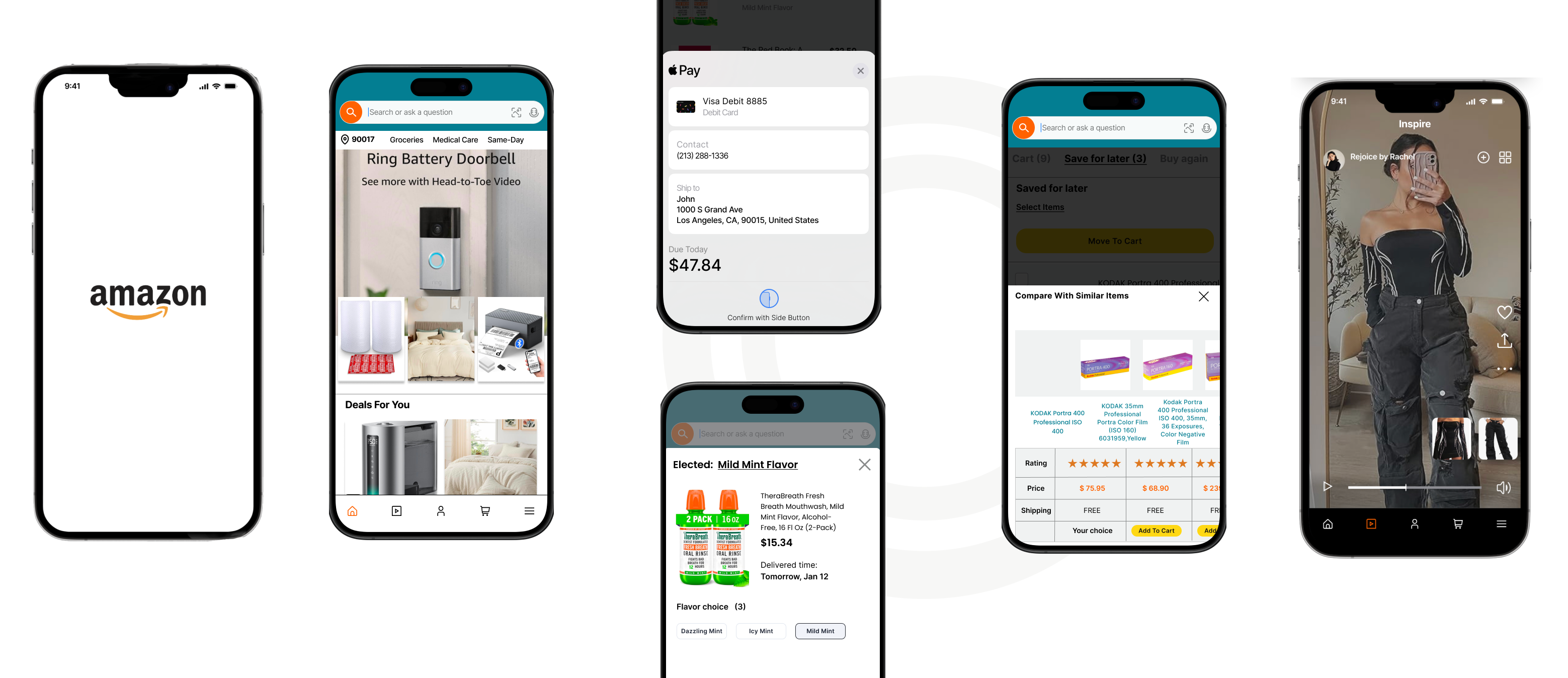
Key flow 1: Change the product detail in the cart

Key flow 2: Check out for multiple items Using difference  method or add a new payment card

Key flow 3: Add the item to save for later and compare with similar items and add the first one in cart

Flexible cart editing experience

This flow empowers users to modify product details directly within the cart without disrupting their shopping journey. Users can update variations such as size, color, or quantity in place, rather than navigating back to the product detail page.By reducing unnecessary back-and-forth navigation, this flow minimizes friction during checkout preparation and supports faster decision-making. It enhances usability by keeping users in context while maintaining full control over their selections.

Seamless multi-item checkout with flexible payment options

This flow is designed to simplify checkout when users purchase multiple items and wish to use different payment methods. Users can split payments, select saved payment options, or add a new card without restarting the checkout process. The solution focuses on reducing cognitive load during a high-intent moment. By clearly structuring payment selection and allowing quick card addition, the experience maintains momentum and builds user trust at the final conversion stage.

Smart decision support through comparison and saving

This flow supports users who are not ready to purchase immediately but want to continue evaluating options. Items can be moved to “Save for Later,” where users can compare them with similar products based on price, ratings, and key attributes. By enabling side-by-side comparison and an easy return-to-cart action, the design reduces decision anxiety and encourages confident purchasing. It transforms hesitation into engagement, increasing the likelihood of eventual conversion.

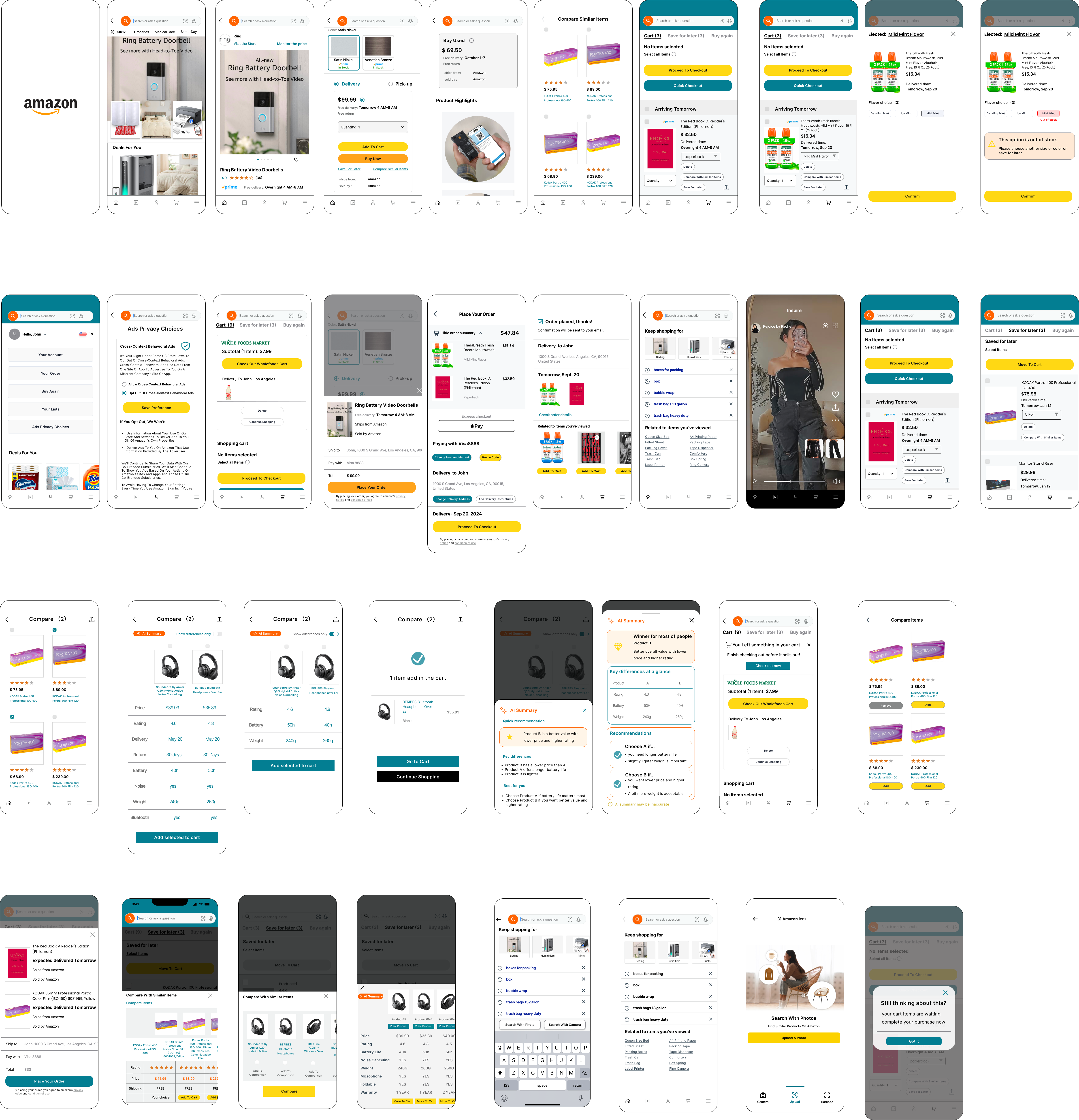
High Fidelity Wireframe

Usability Testing

In this iteration, I tested the prototype with five participants across three key Amazon shopping tasks: editing product details directly in the cart, checking out multiple items with different payment methods, and saving items for later while comparing similar products. Everyone was able to complete all the tasks (100% completion rate), and most flows took less than 30 seconds. Overall, the experience felt clear and intuitive, but the sessions also showed room for improvement, especially around payment flexibility, stronger visual hierarchy, and clearer feedback during interactions.

How can payment switching feel faster and clearer?
How can primary actions stand out more in checkout?
How can edits in cart feel more confirmed and visible?
How can multi-item checkout feel simpler?
How can saving and comparing items feel more seamless?

Iteration

So returning to the drawing board. During the iterative process, I confronted the following needs:

- Enable inline payment editing and switching during checkout
- Improve dropdown visual hierarchy and selection clarity
- Add a clearer Compare entry point on the product page and highlight key differences in the comparison view

🛒 1. Cart Editing Flow


Before:

- Product detail dropdown worked but lacked clear hierarchy and visual consistency.
- Limited edit options; users mentioned confusion when modifying quantities or variants.

After (Iteration):

- Dropdown menus are visually refined with clearer spacing and stronger contrast.
- Confirmation button now more prominent and consistent across screens.
- Price and quantity update feedback improved for real-time clarity.

💳 2. Checkout Flow


Before:

- Only Apple Pay option available.
- Missing standard credit card and payment input screens.
- Some buttons misaligned and non-scrollable sections limited interaction realism.

After (Iteration):

- Full checkout process added, now includes shipping address, payment details, and review order steps.
- Multiple payment options introduced (Apple Pay + Credit Card).
- Button visibility and layout fixed; scrollable content enabled for a smoother user flow.
- Added confirmation and order summary pages for completeness.

💳 2. Compare Flow


Before:

- No clear entry point to compare similar items.
- Users had to switch back and forth between product pages manually.
- Key differences (price, rating, shipping) were not visually aligned.
- Comparison lacked decision-focused highlights.

After (Iteration):

- Added a dedicated “Compare with Similar Items” entry point on product and cart pages.
- Introduced a side-by-side comparison view with aligned price, rating, shipping, and key specs.
- Highlighted differences visually to reduce cognitive load.
- Added direct “Add to Cart” CTA within comparison view for faster decision-making.

06/ Key takeaways

Challenge

- Enhancing the shopping cart and checkout experience without disrupting Amazon’s existing ecosystem and visual identity.


- Maintaining consistency and navigation simplicity while introducing new features like customization and comparison.

Lesson learned

- A consistent and simplified design system can improve clarity and speed up prototyping, especially when working within an existing brand framework.

- Prioritizing usability testing early helps identify small details have a big impact on user confidence.

- Seamlessly integrating new flows into an established platform requires focusing on both functionality and familiarity to keep users engaged and comfortable.