MOVIDEO

Moving easy and efficient for young professionals

BACKGROUND

Movideo was built to help young professionals deal with the most frustrating parts of moving—stressful packing, tight budgets, and not knowing which services to trust. Research showed that many users prefer to pack on their own but struggle with staying organized, efficient, and confident in their choices. Movideo brings together video tutorials, planning tools, and vetted service options in one place to make moving feel clearer, easier, and more manageable.
CHALLENAGE & RESULT

Movideo addresses common moving challenges: packing stress, limited budgets, and trust in moving services, by offering a video-first platform with clear guidance. Usability testing informed key improvements to navigation and layout, helping create a more intuitive and trustworthy experience for young professiona

PROJECT GOAL

Movideo aims to make moving simple, affordable, and stress-free for young professionals by combining expert video tutorials, interactive planning tools, and curated service connections into one seamless, user-friendly platform.

OVERVIEW

Role

Product design (UI/UX)

Timeline

6 weeks

Tool used

Miro/Figma

This project is a fictitious scenario, completed as a part of Designlab's UX Academy.

OUTCOMES

The final design addresses users' struggle to stressful packing, tight budgets, and not knowing which services to trust

01/ Empathize - Exploring the User's Needs

USER INTERVIEW

INSIGHT #1

Packing is the biggest source of stress during moving.
- Most users prefer packing on their own to save money, but struggle with organization, efficiency, and physical fatigue.

INSIGHT #2

Trust and transparency heavily influence moving decisions.
- Users are hesitant to hire moving companies due to hidden costs, poor past experiences, and unclear pricing.

INSIGHT #3

Affordability defines what users consider a “successful” move.
- Participants consistently described an ideal moving experience as low-cost, efficient, and convenient.

OVERVIEW

- 5 participants
- Age between 20-30 years old
- voice/video interview
- Time about 20 mins
- Senior student in collage/Young professionals

Recognizing patterns from categorizing interview notes ⬆️

02/ 🤔Do Apps that Address users need already exist in the Market?

COMPETITOR ANALYSIS

INSIGHT💡

While competitors provide valuable resources, they often fail in delivering a seamless, trustworthy, and user-friendly moving experience. This highlighted an opportunity for Movideo to differentiate by offering transparent costs, accessible video guidance, and a streamlined, mobile-first user journey.

OVERVIEW

To understand the moving-service landscape, I analyzed four major competitors—Moving.com, Bellhop, Move Matcher, and Angi

Focusing on their mission, target users, strengths, weaknesses, and feature sets.

Competitor analysis to understand exisiting apps in the market⬆️

03 / Define - Establishing the User's Needs and Problems

PERSONA DEVELOPMENT

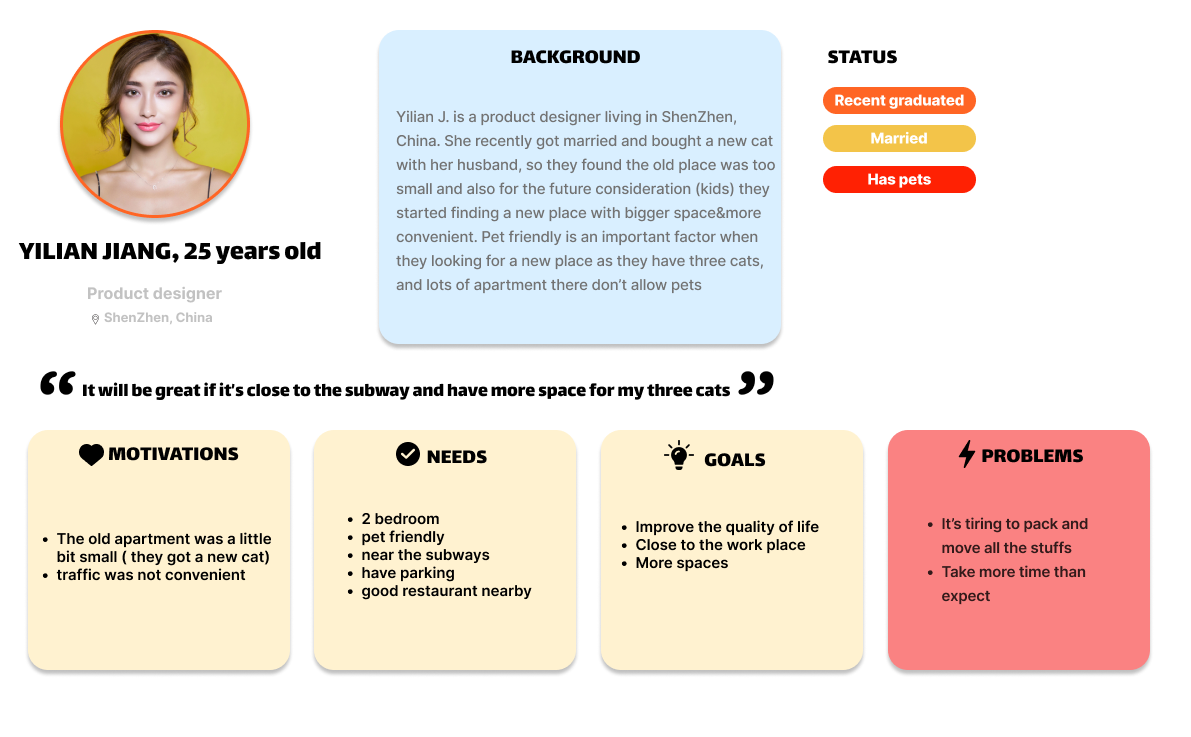
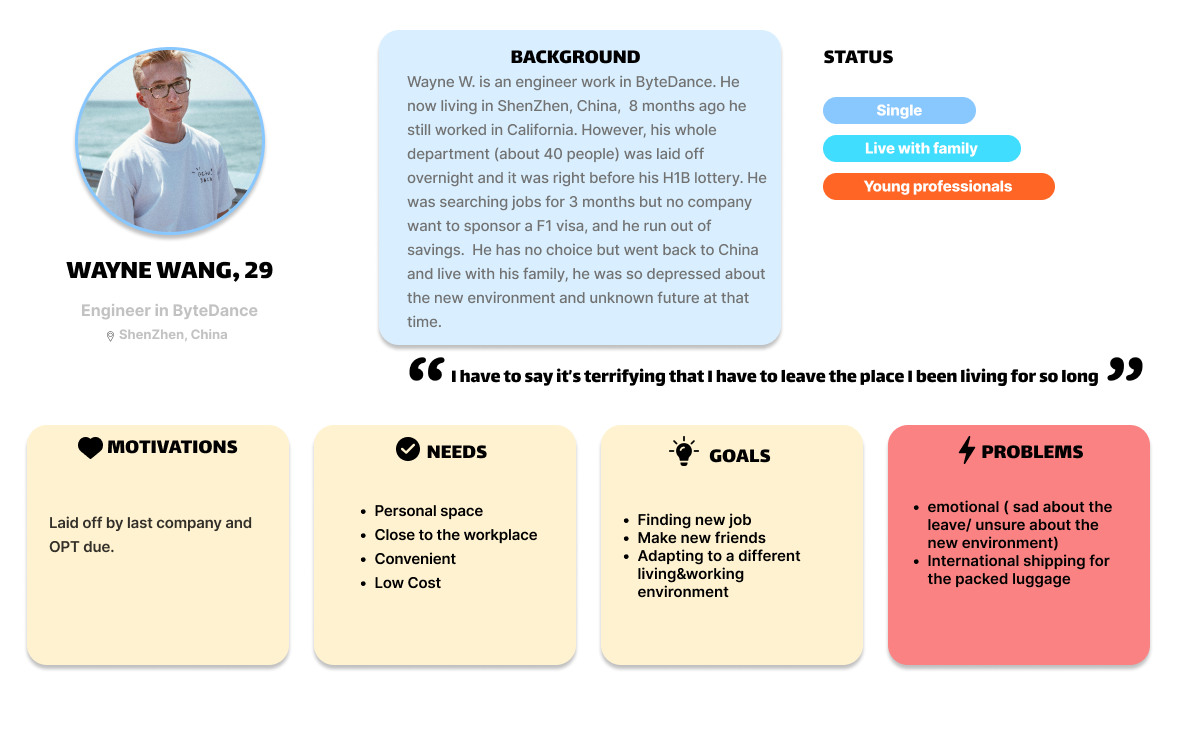
Through research, I noticed clear patterns among people preparing to move. Many preferred packing on their own to save money, but often felt overwhelmed by the time, effort, and lack of clear guidance. Budget limits, trust issues with moving services, and the emotional stress of major life changes made the process even more challenging.

Based on these insights, I created personas that reflect young professionals navigating relocation during key transitions. They value affordability, efficiency, and transparency, while also needing structure and reassurance. These personas helped guide design decisions by keeping both practical and emotional needs at the center of the Movideo experience.

OVERVIEW

- Persona Development

- Problem Statements

PROBLEM STATEMENTS

From here, I listed out around 20 different "How Might We" statements to see how problems I can focus my efforts to tackle for the user. From this exercise, I decided to focus on the following 3 statements:

- How might we help users categorize their packing when moving so that they won’t stuck in packing and have less stress?

- How might we help users feel confident and protected when hiring a moving company?

- How might we help users find better and lower cost solution for moving so that they can afford it?

04 / Ideate - Creating the Framework

OVERVIEW

- Ideation

- Storyboarding

- Information architecture

IDEATION

I used Crazy 8s to rapidly generate and refine ideas from research, then grouped the sketches by theme to identify key concepts.

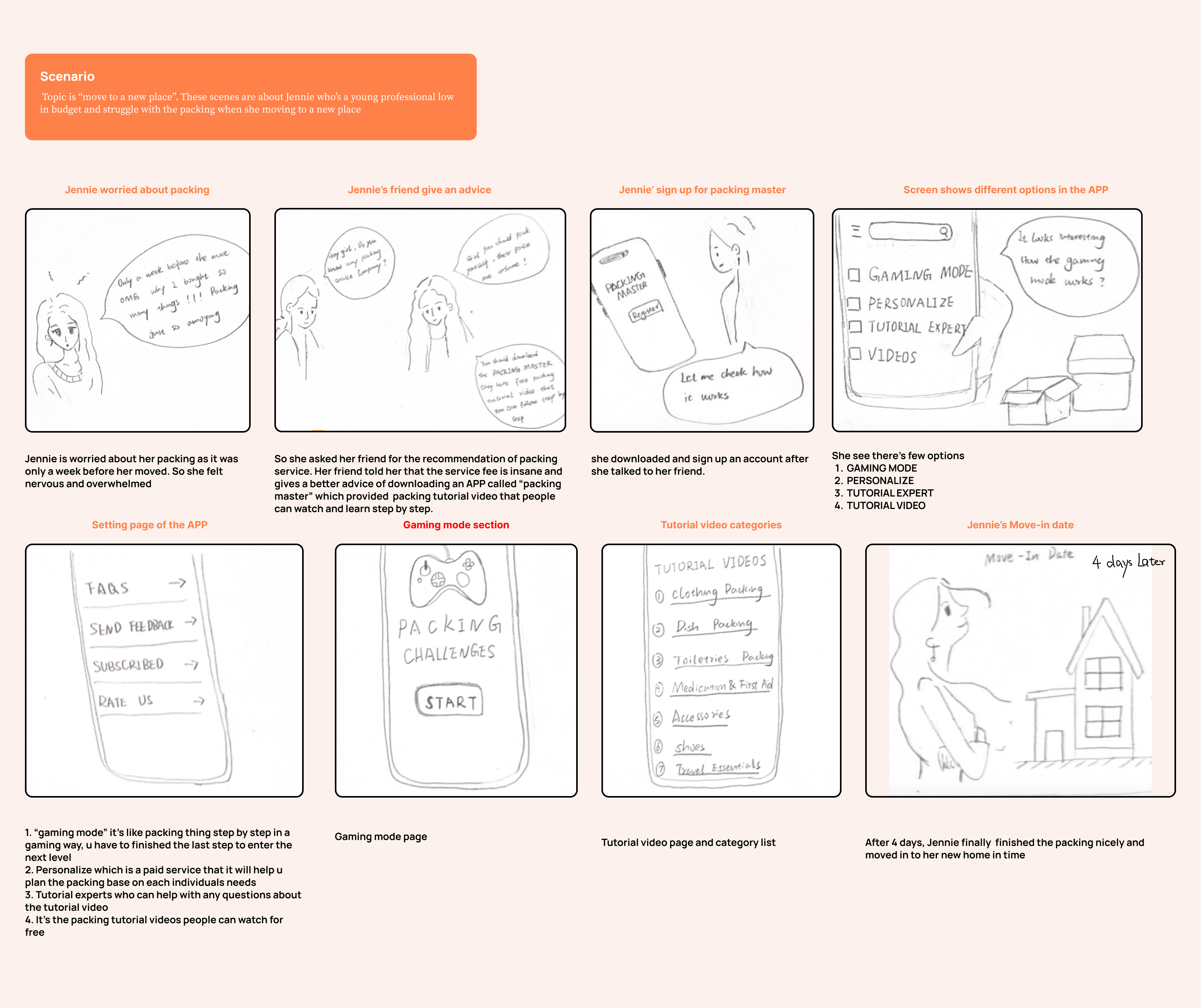
STORYBOARDING

INFORMATION ARCHITECTURE

I built a sitemap that includes primary, secondary, and tertiary navigation. First, I developed the primary navigation by defining the main actions users might take: My Account, Settings, Planner, Moving Service, and Tutorial Videos. Next, I explored and expanded each of these sections.

05 / Ideate - User Flows

USER FLOWS

I’ve created user flows for the app. It was crucial to turn all my work into pages, buttons, inputs and links. After creating user flows, I’ve decided to develop in depth two task flows that I’ve eventually tested with my prototype: Book an appointment for packing service and watch tutorial videos.

OVERVIEW

- User Flows

#1 Book an appointment for packing . The flow includes the search of a packing person; the choice of what kind of packing service and time slot and finally the checkout.
#2 Watch tutorial videos . The flow includes the search of tutorial videos for packing; the choice of what kind of packing video they want and can  save the videos for future watch

06 / Prototype - Let's make the Design!🧑‍🎨

OVERVIEW

- Wireframes

- Branding & UI Kit

- Final

WIREFRAMES

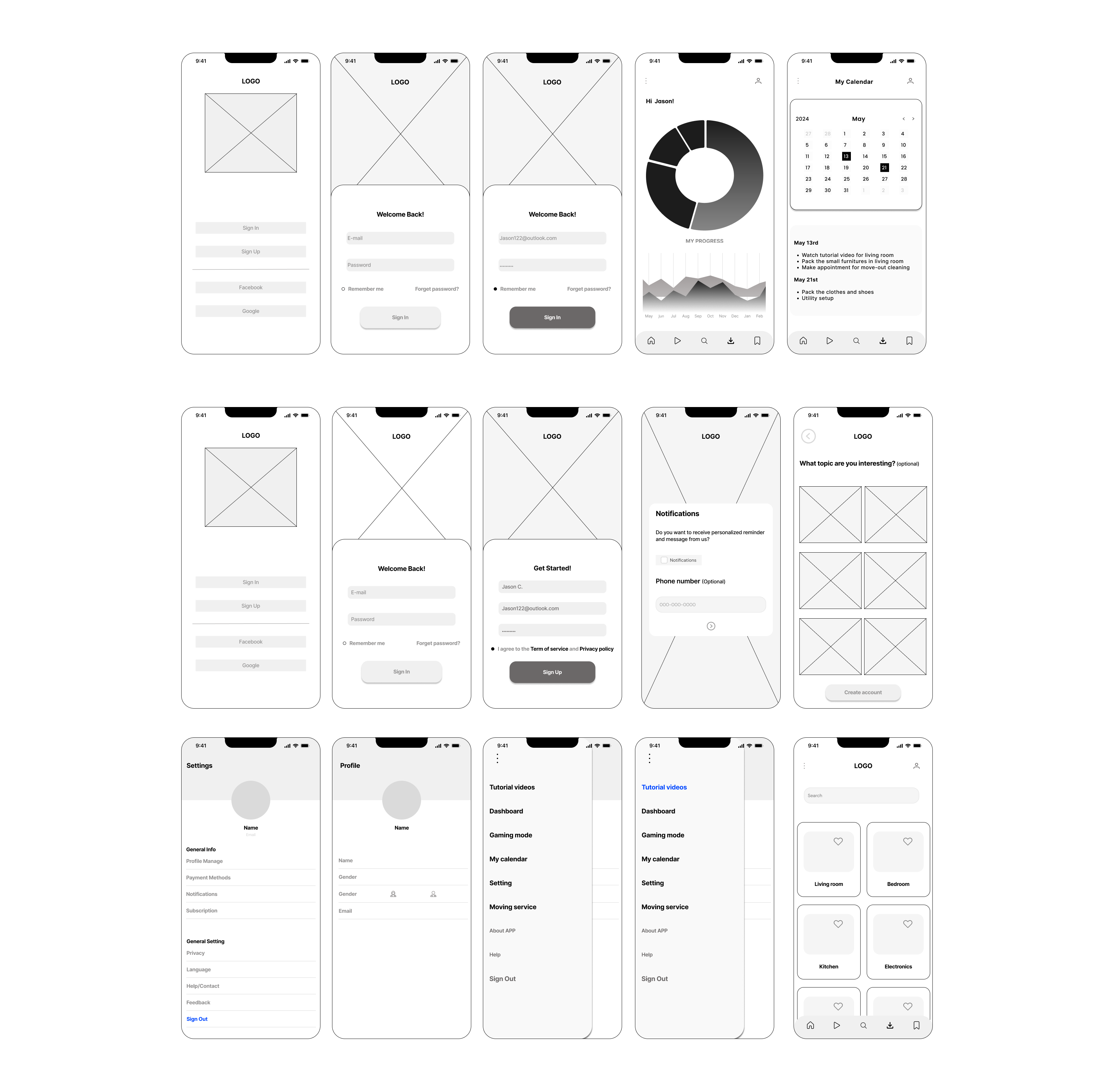
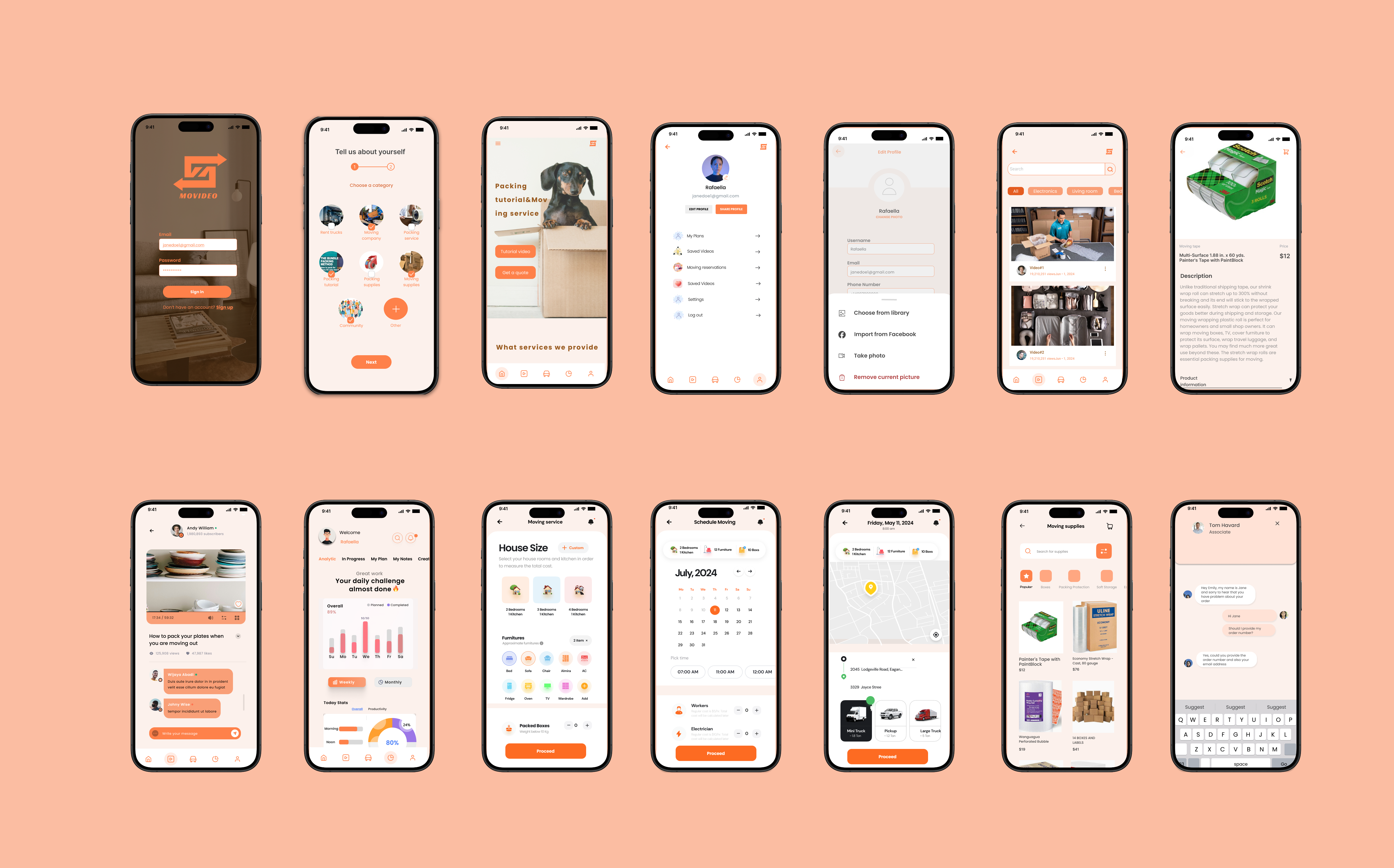
I began by sketching the core user journey screens for Movideo — including the homepage, login and sign-up flow, personalized dashboard, calendar view, tutorial library, and service booking sections. Each screen was designed to map out how users can smoothly transition between watching tutorial videos and scheduling their own packing appointments.

Click to view in Figma

BRAND & STYLE TILE

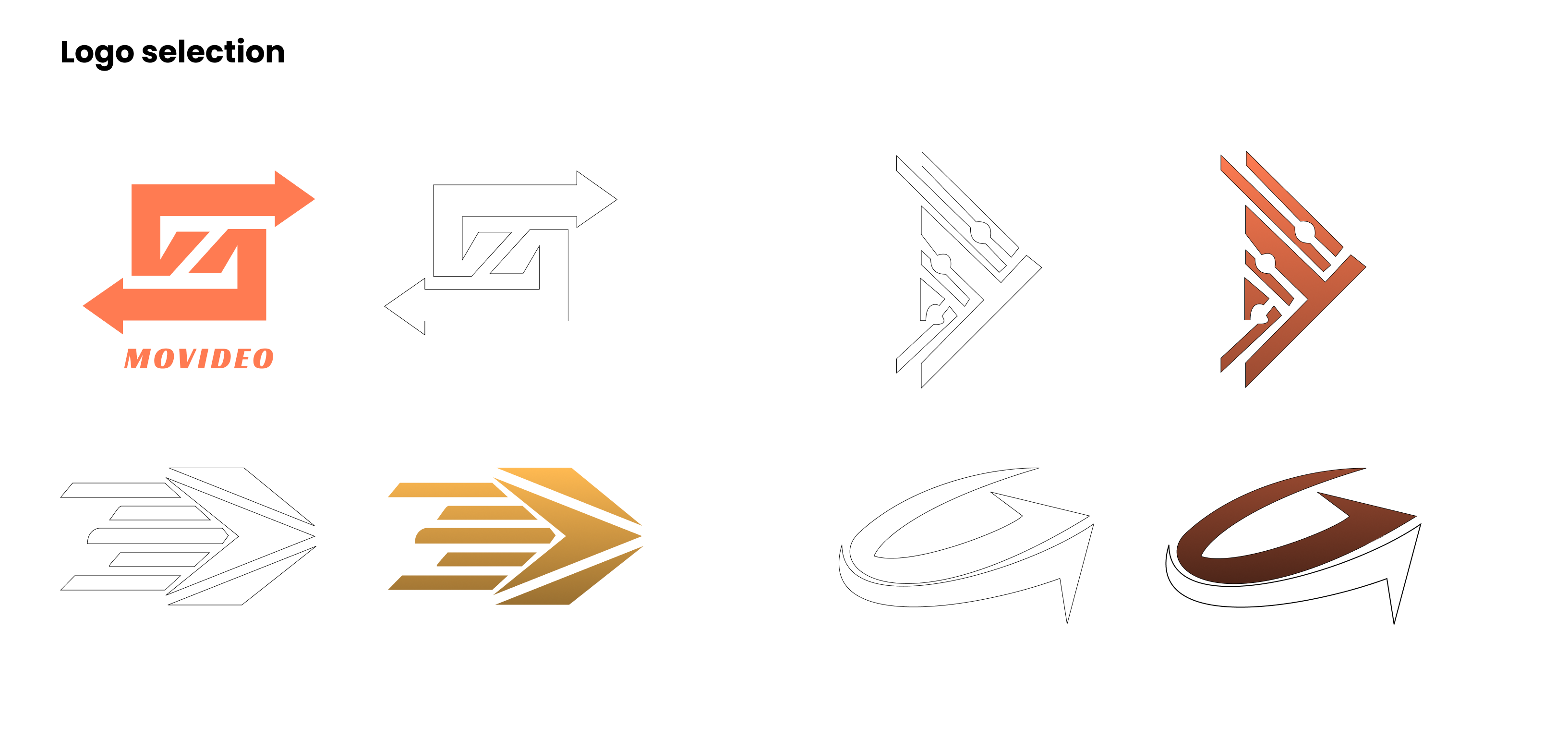
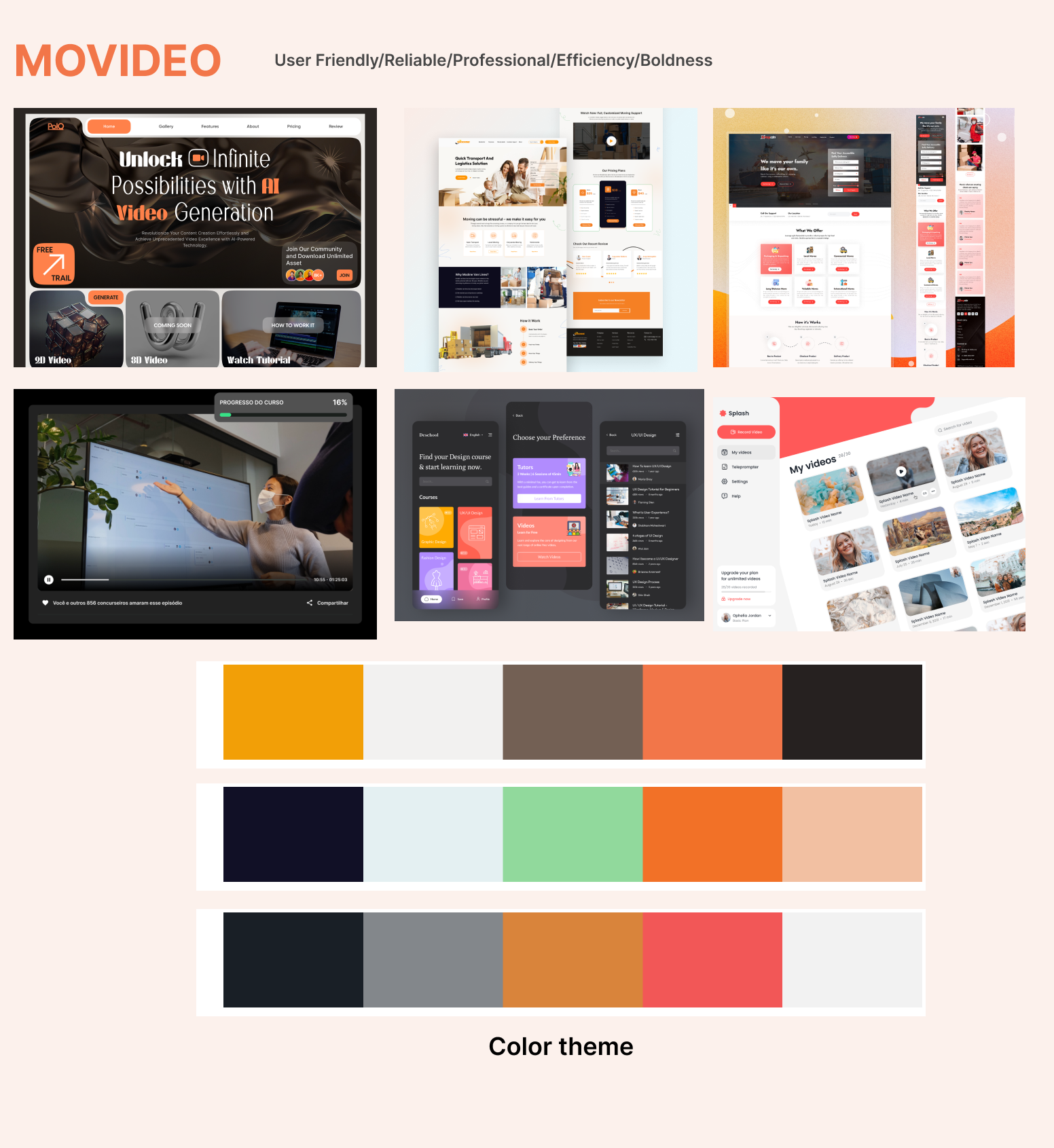
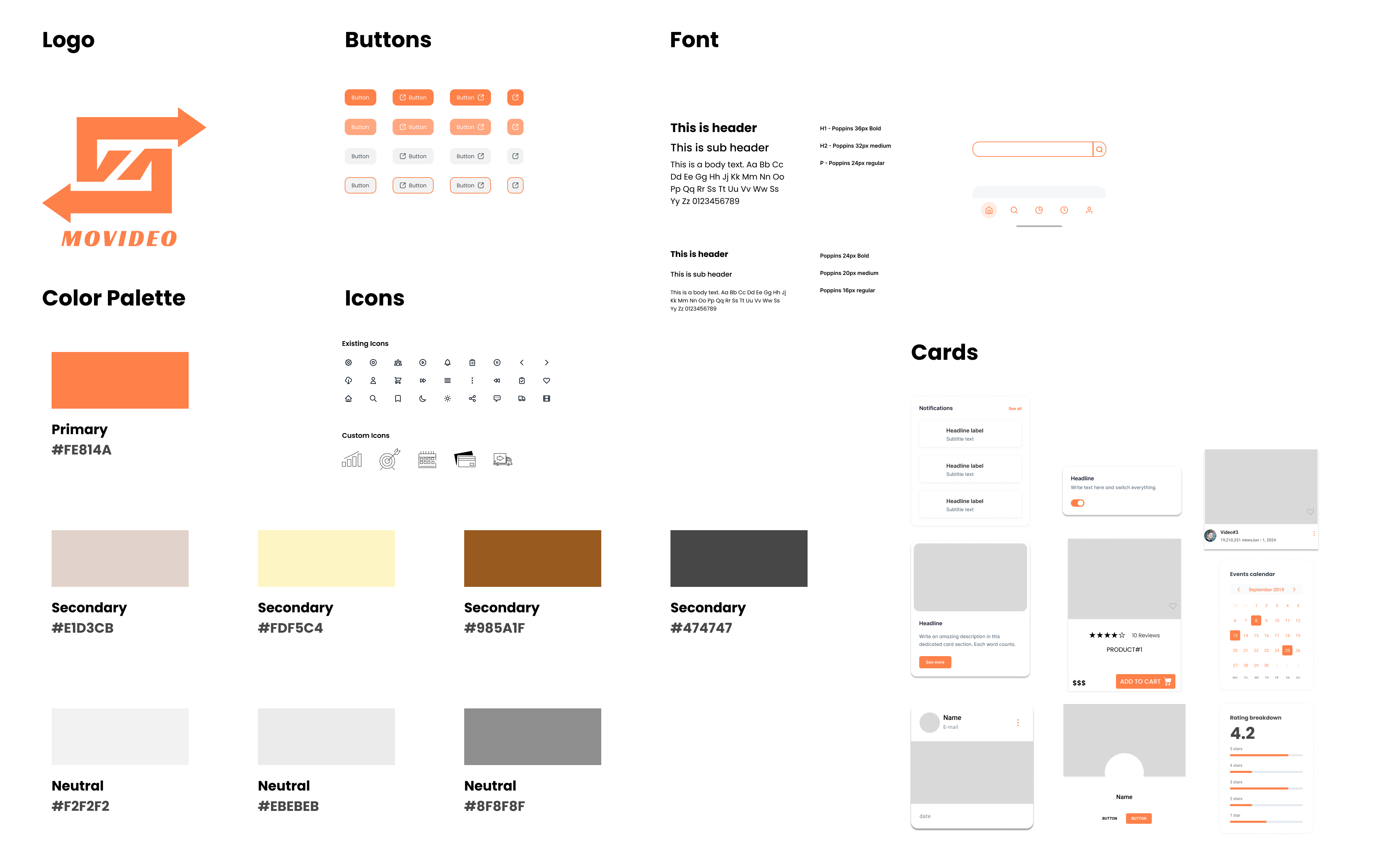
The logo represents Movideo’s focus on learning, action, and connection. Interlocking arrows symbolize movement and exchange, while the bold form and warm orange color convey reliability, energy, and motivation.

The color palette and visual style were chosen to balance warmth and reliability. Bold orange accents add energy and motivation, while neutral tones provide clarity and trust, creating a user-friendly and professional experience for a high-stress moving process.

UI COMPONENT

FINAL DESIGN

View The High Fidelity Prototype

Tutorial Videos Screen

Tutorial Videos Screen

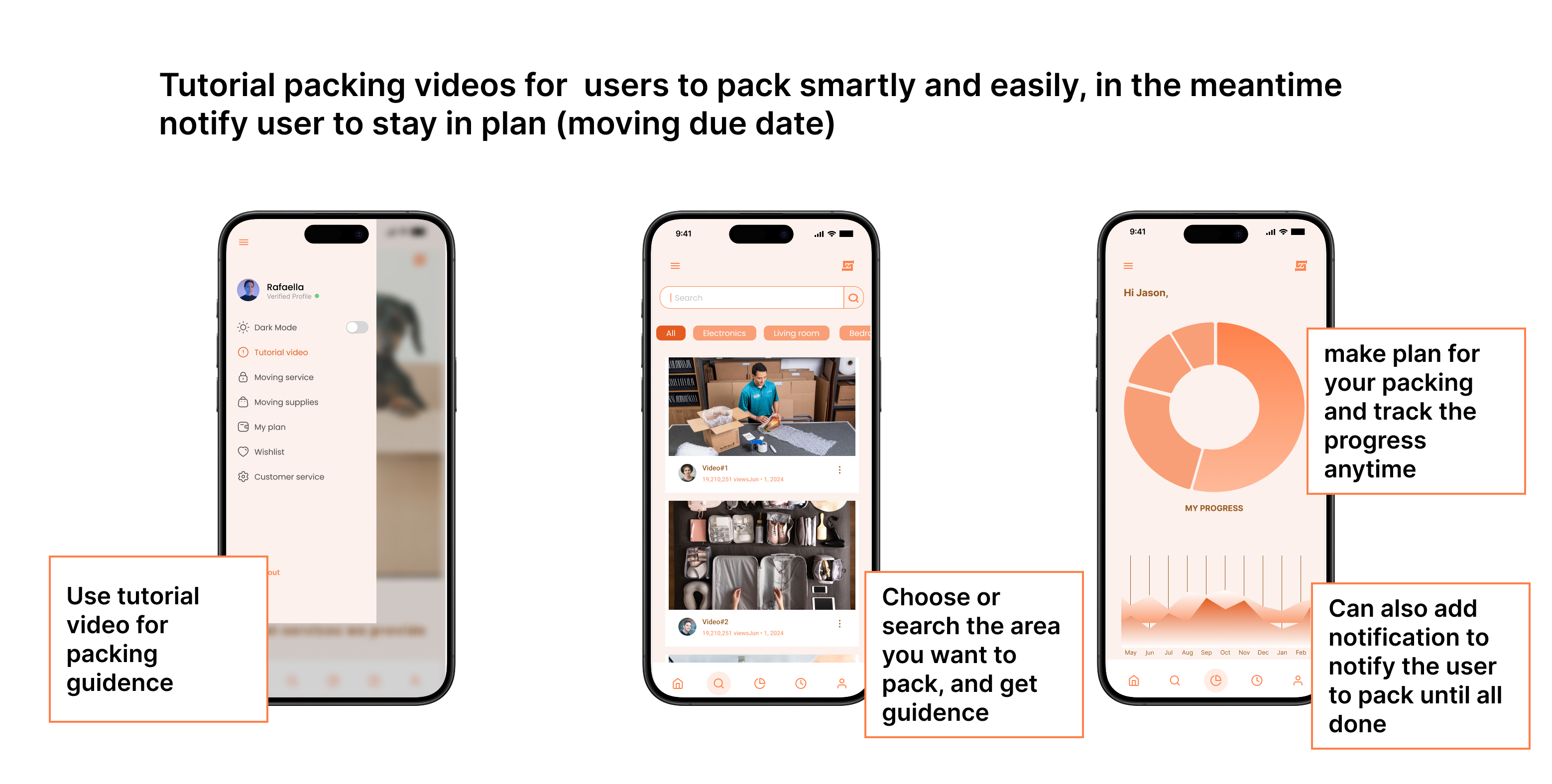
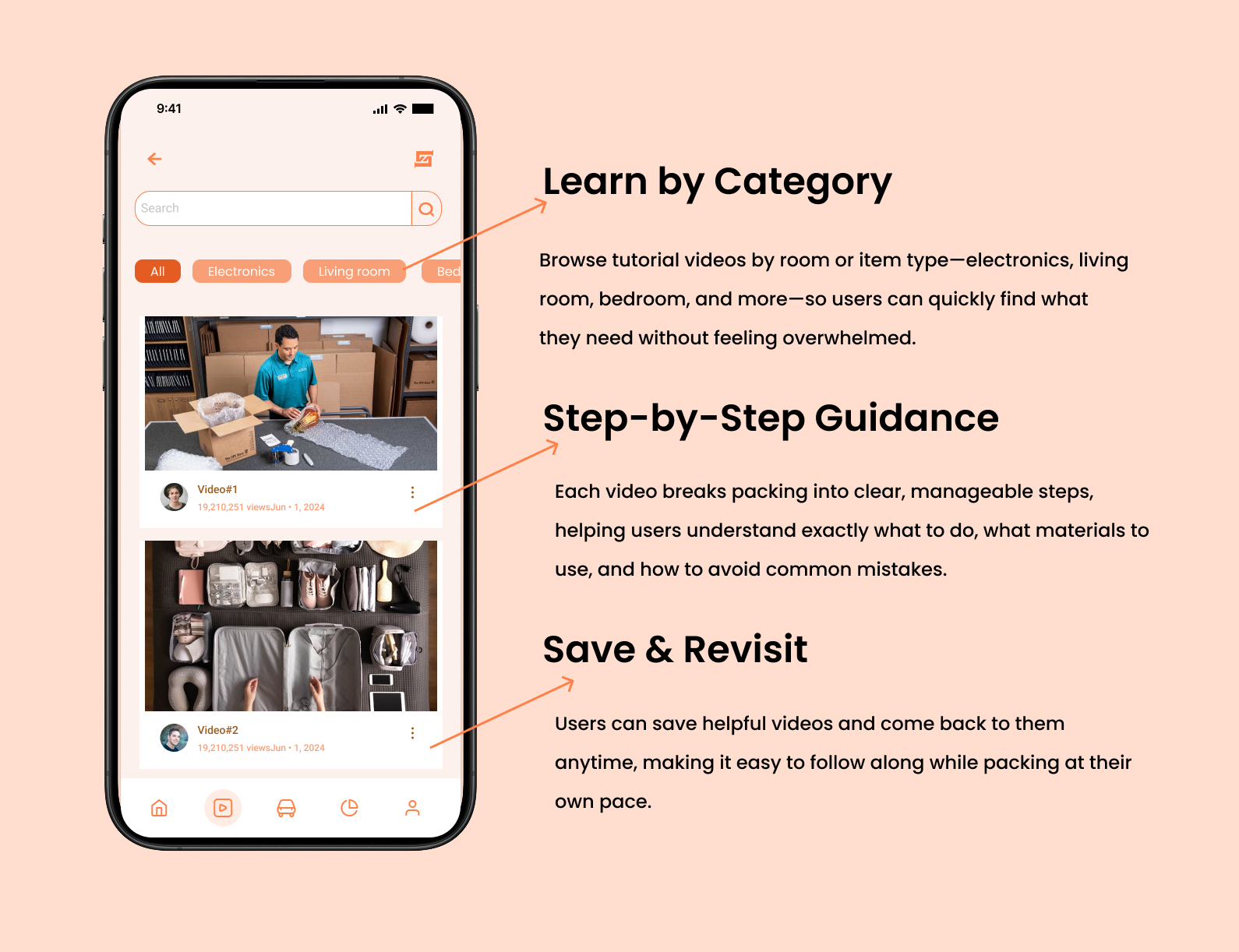
The Tutorial Video screen helps users learn how to pack efficiently through clear, step-by-step videos organized by room and item type. Users can quickly find relevant guidance, save videos to revisit while packing, and follow along at their own pace. By turning complex packing tasks into simple visual instructions, this feature reduces stress and helps users feel more confident throughout the moving process.

Moving Service Screen

Moving Service Screen

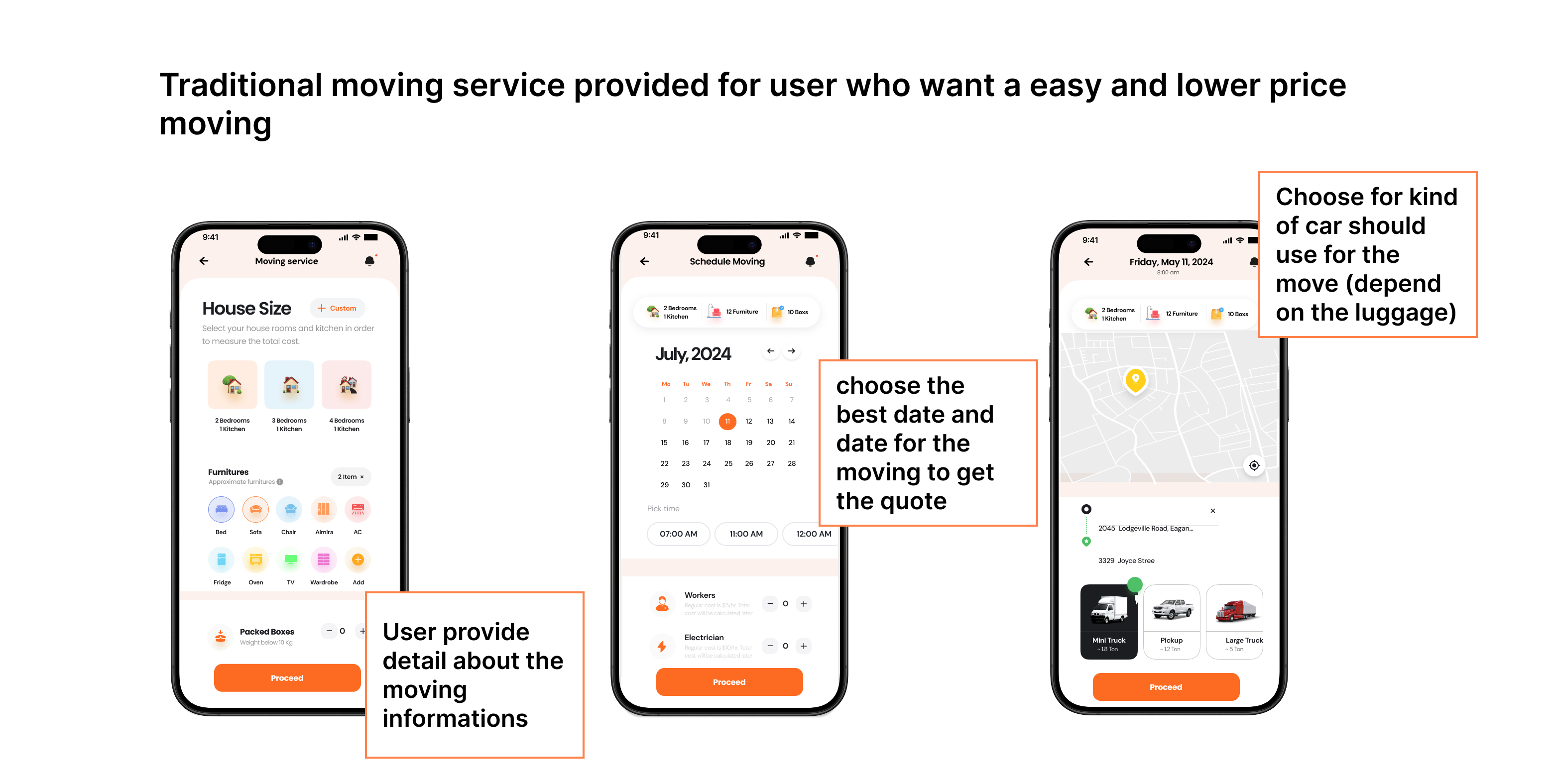
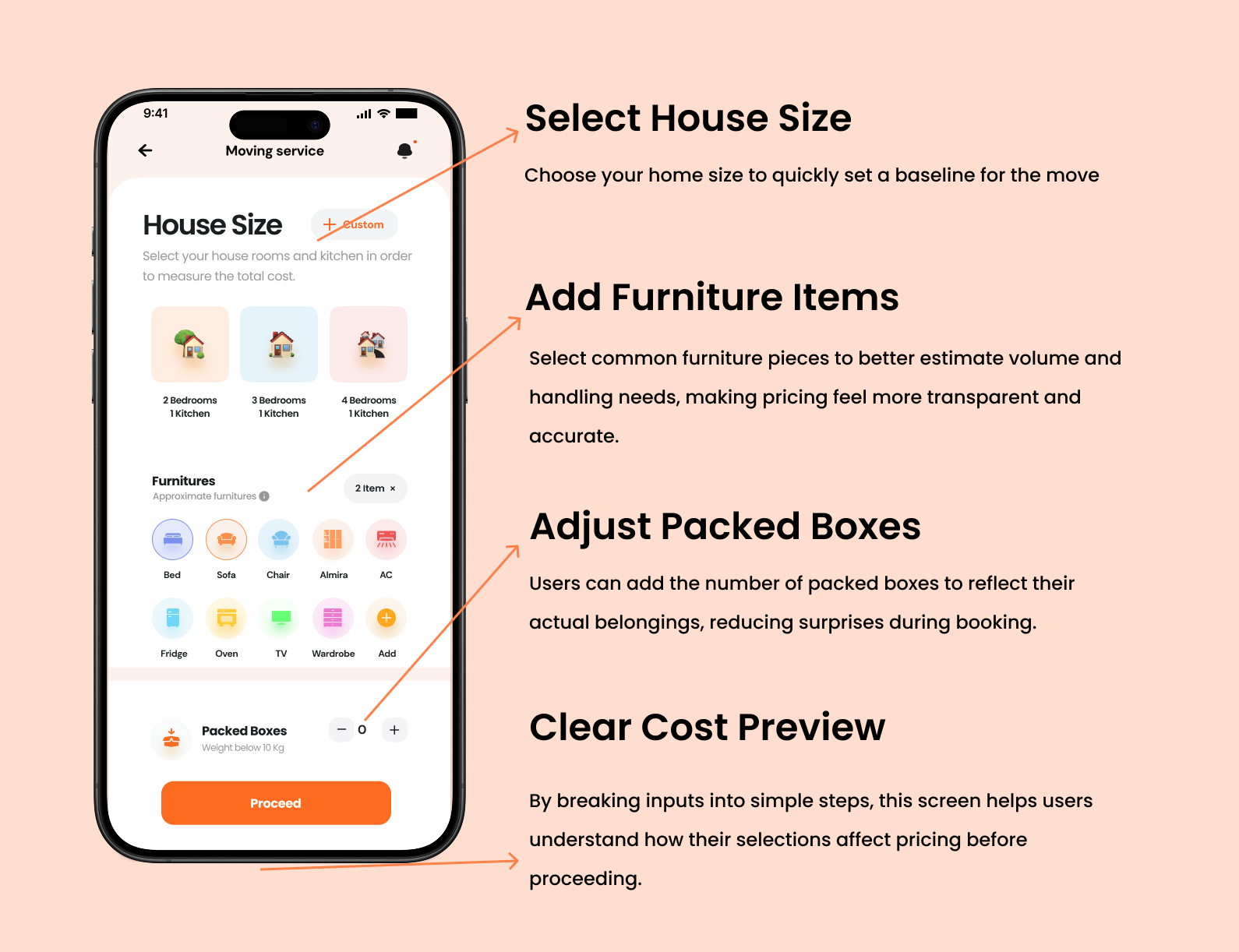
This screen helps users estimate moving costs by selecting their home size, furniture, and boxes through clear, visual steps, making pricing more transparent and easier to understand.The Tutorial Video screen provides step-by-step packing guides organized by room and item type, allowing users to quickly find, save, and follow relevant videos at their own pace—reducing stress and building confidence throughout the moving process.

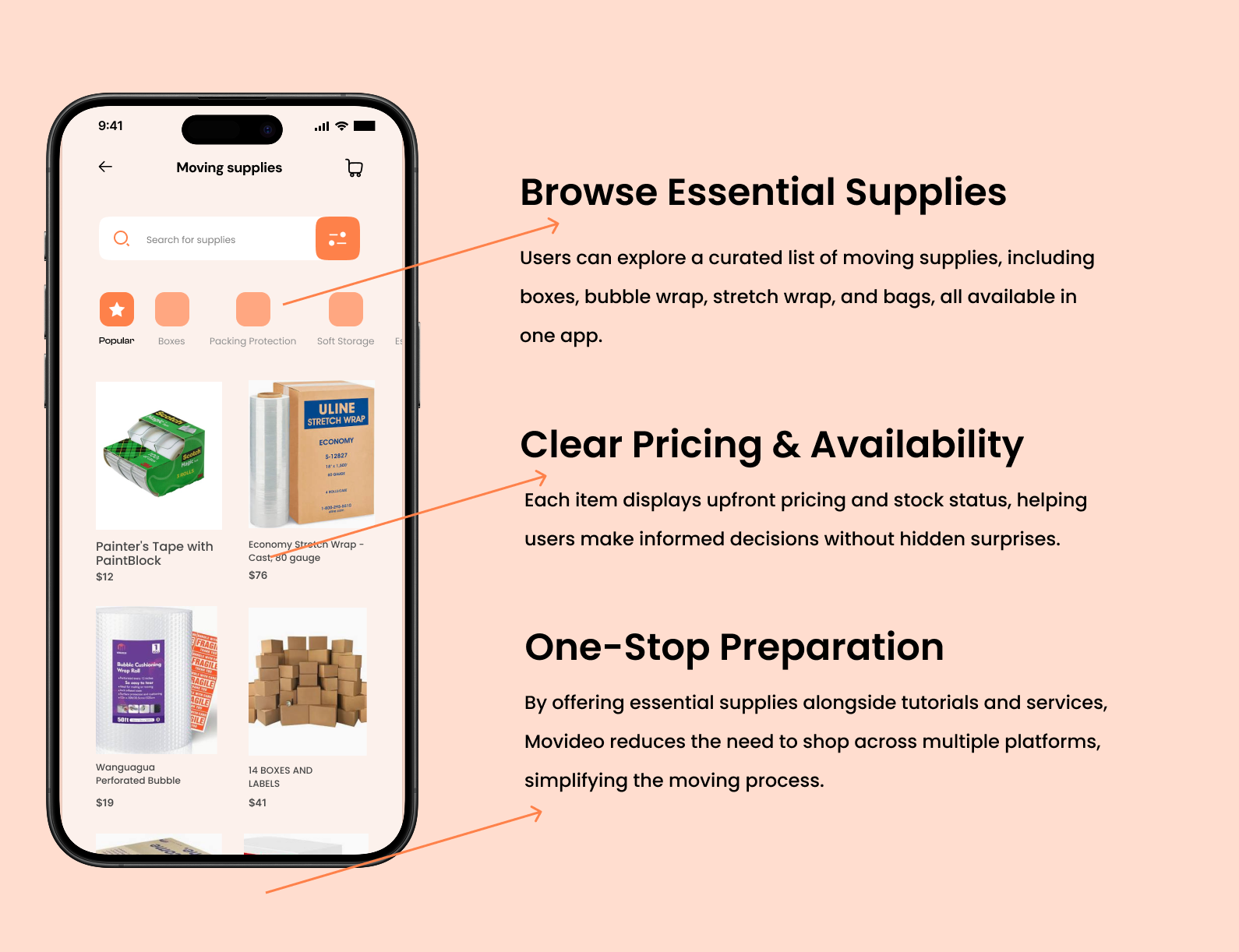
Moving supplies Screen

Moving supplies Screen

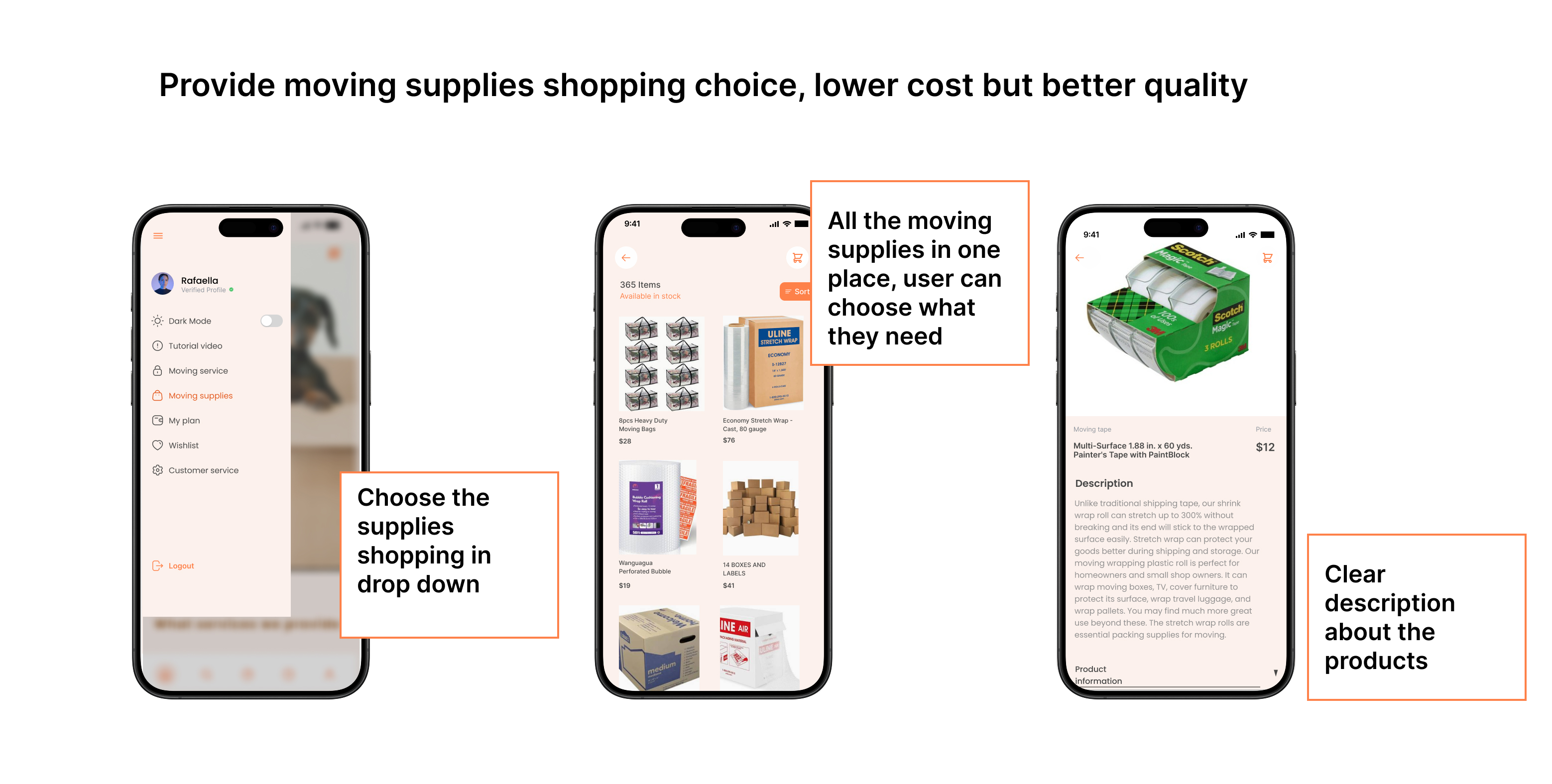
The Moving Supplies screen allows users to browse and purchase essential packing materials in one place, with clear pricing and real-time availability. By offering curated supplies, simple sorting options, and transparent product details, Movideo makes it easier for users to prepare without jumping between different platforms. This streamlined shopping experience helps reduce last-minute stress and supports a smoother, more organized move.

07 / Iterations based on Usability Testing Data

OVERVIEW

- Usability Test Findings

- Priority Revisions

- Next Steps

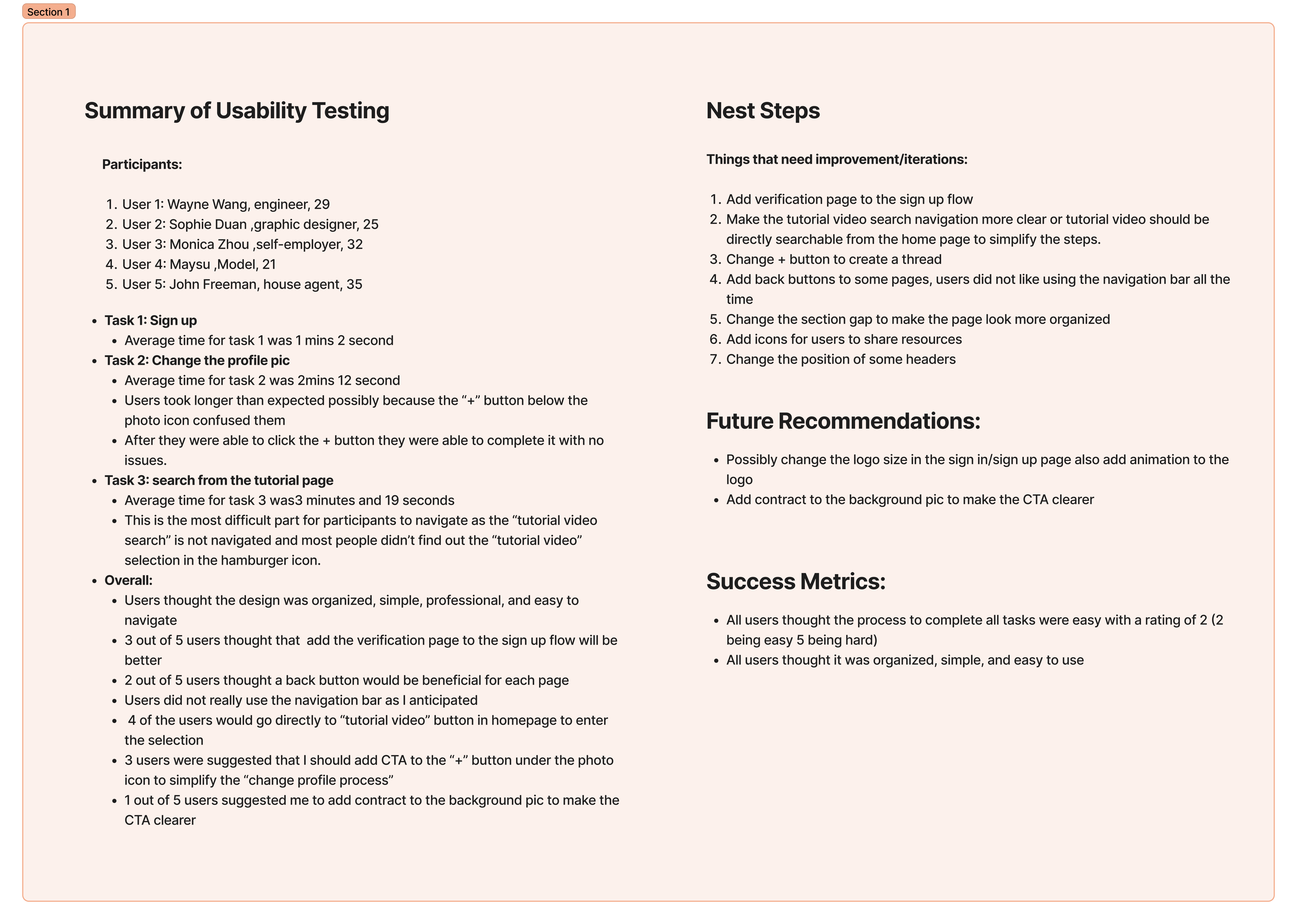
Usability Test Findings

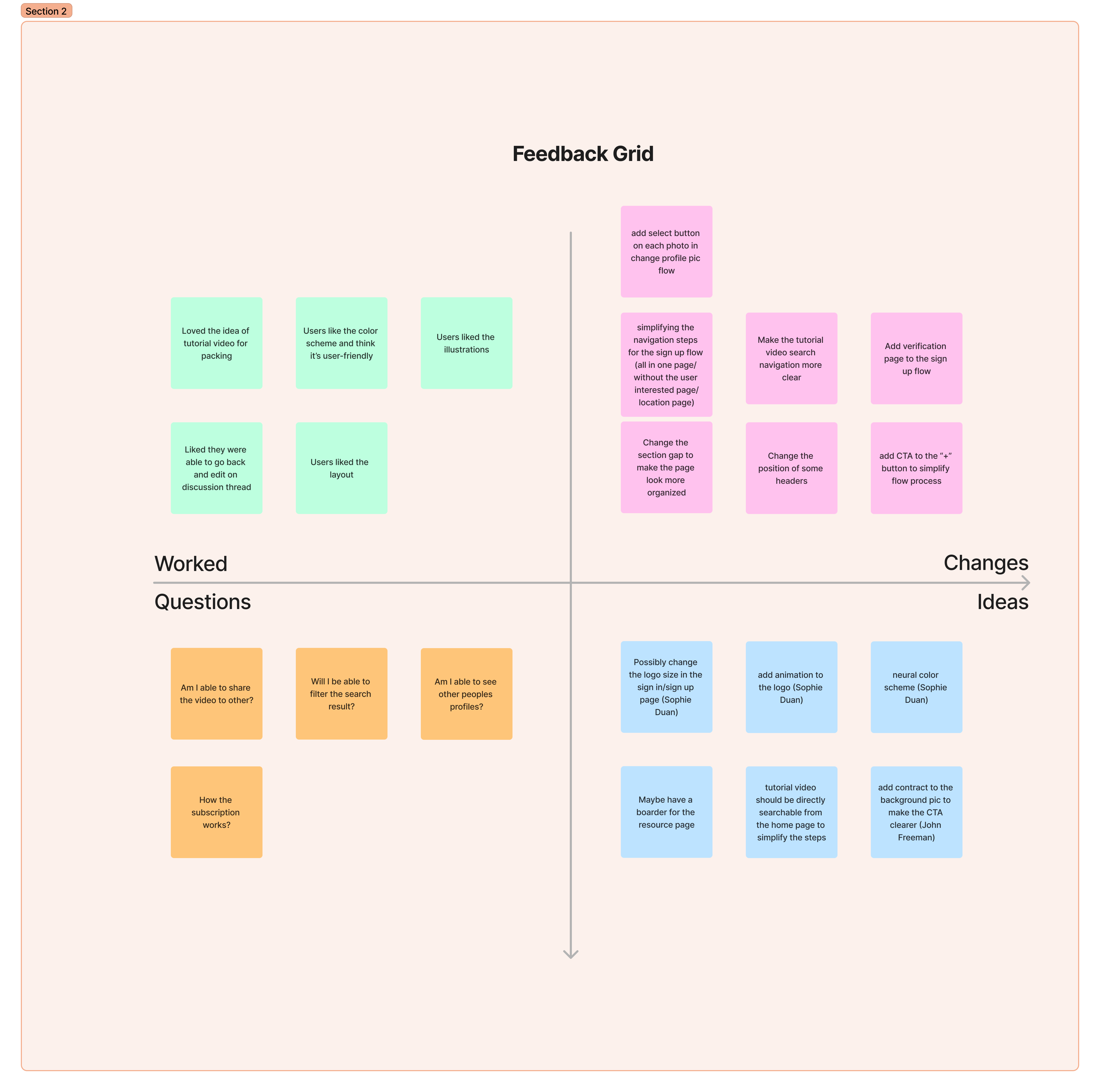
During usability testing, most users said Movideo felt clean, simple, and easy to use. They were able to complete key tasks like signing up and updating their profile without major issues, though a few interactions caused confusion—especially around icon-based actions and where certain features lived. The biggest pain point was finding the tutorial video search, which many users missed when it was tucked inside the menu. Overall, the feedback showed that small tweaks like clearer navigation, better CTAs, and added guidance would make the experience feel smoother and more intuitive.

Priority Revisions

View Revised High Fidelity Prototype
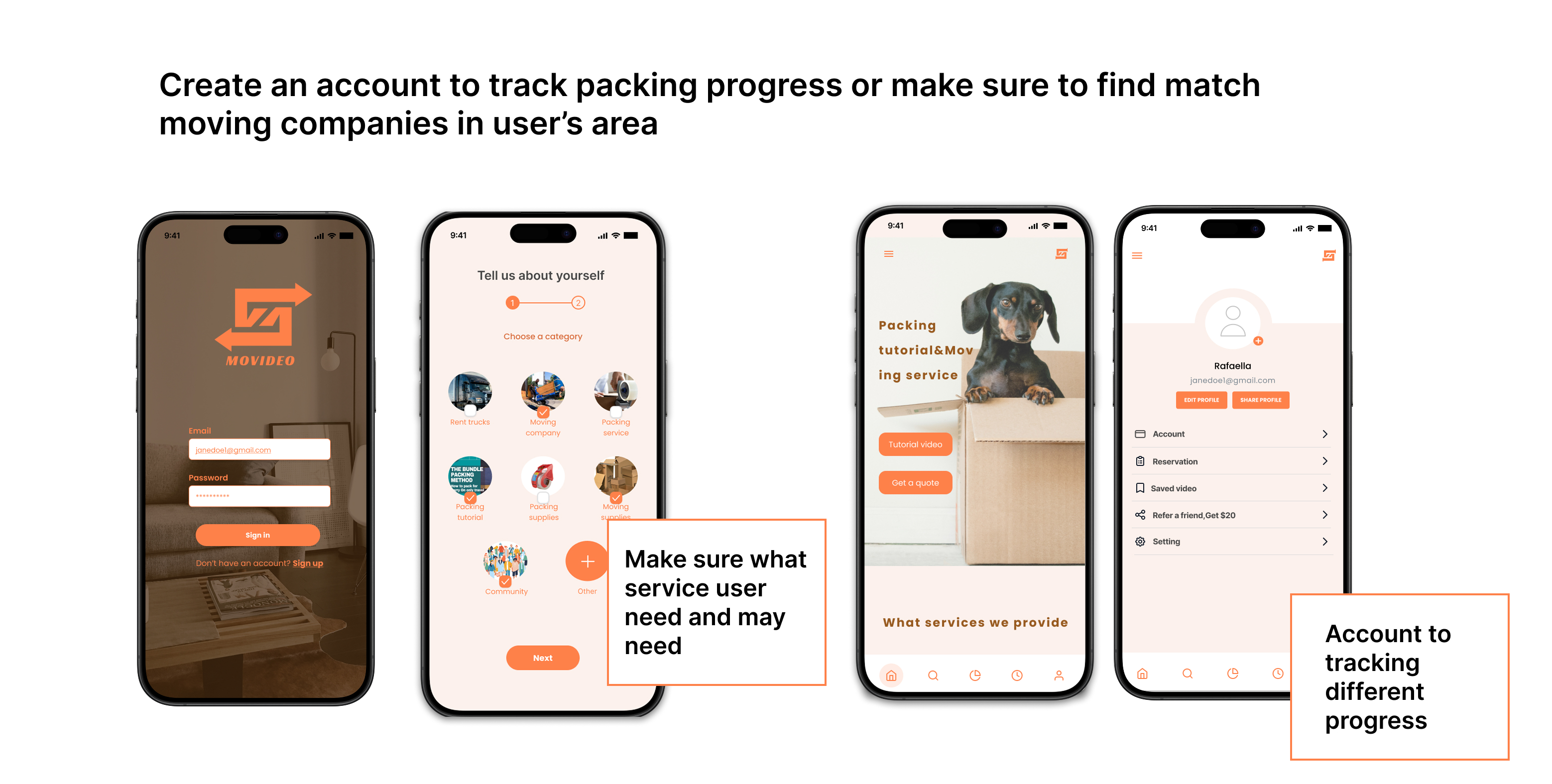
Based on the usability testing feedback, I created a revised high-fidelity prototype that focuses on clarity, discoverability, and smoother navigation. In this iteration, I made key features such as tutorial videos and moving services more visible from the homepage, simplified the sign-up flow by adding clearer steps and verification, and improved wayfinding with back buttons and clearer CTAs. I also refined layout spacing, adjusted visual hierarchy, and increased contrast in important areas to help guide user attention. Overall, this version reflects direct user feedback and results in a more intuitive, confident, and streamlined moving experience.

Prototype breakdown

- I’ve added verification page to the sign up flow
A verification step was added to the sign-up flow to help users feel more secure and confident when creating an account. During usability testing, several users mentioned wanting clearer confirmation that their information was successfully submitted and that the process was complete. By introducing a verification page, the flow now feels more intentional and trustworthy, reduces uncertainty, and reassures users before they move forward into the app experience.
- Make the tutorial video search navigation more clear or tutorial video should be directly searchable from the home page to simplify the steps.
During usability testing, several users struggled to find tutorial videos and felt that too many steps were required before reaching the content they needed. To address this, I made tutorial videos directly accessible from the home screen and improved the visibility of the search entry point. By surfacing tutorials earlier in the flow, users can immediately start learning without navigating through multiple menus, reducing friction and making the experience feel faster, more intuitive, and less overwhelming—especially during a stressful moving process.
- Adding the Moving service user flow as it's one of the main service in the app
The moving service flow was added as a core part of the app to reflect how users actually approach moving in real life. Research and usability testing showed that while users value learning how to pack on their own, many still want the option to book professional help when tasks feel too time-consuming or overwhelming. By integrating the moving service flow directly into the app, Movideo supports both DIY and assisted moving needs in one place, allowing users to seamlessly transition from learning through tutorials to requesting quotes and services without leaving the experience.

08 / Reflections

➡️ Project Next Steps:

Testing out the iterated design from usability testing
Testing the updated timer to make further interations if needed

Track user experience after MVP release
Sending out periodic survey to track users' motivation and training habits. The data can be used for further iterations or to develop new features

🔁 Lesson learned:

Optimizing Interviewee Selection ProcessTesting out the iterated design from usability testing

Throughout the Movideo project, I learned the importance of building around real user behavior rather than assumptions. From the early research to usability testing, user feedback shaped every iteration from simplifying the service-booking flow to improving the tutorial-watching experience. Each test revealed new insights on how users expect digital guidance and service convenience to merge seamlessly.